Annotation 기반 설정 파일
✒️ 2025-05-28 13:03 내용 수정
설정
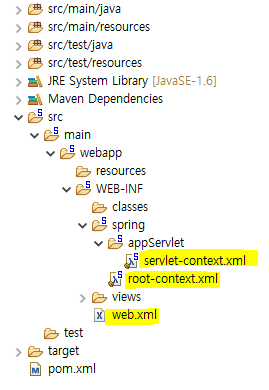
- web.xml, root-context.xml, servlet-context.xml 파일들 대신에 Annotation 기반의 클래스를 생성하여 대신 역할을 수행하도록 설정한다.
- 설정이 꼬이지 않게 하기 위해 세 파일을 모두 삭제한다.
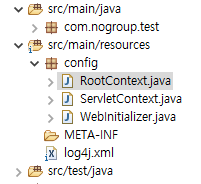
- src/main/resources에 config 패키지를 만들어 이 위치에 클래스들을 만든다.
1. web.xml 역할의 클래스
- web.xml 파일
<?xml version="1.0" encoding="UTF-8"?>
<web-app version="2.5" xmlns="http://java.sun.com/xml/ns/javaee"
	xmlns:xsi="http://www.w3.org/2001/XMLSchema-instance"
	xsi:schemaLocation="http://java.sun.com/xml/ns/javaee https://java.sun.com/xml/ns/javaee/web-app_2_5.xsd">

	<!-- The definition of the Root Spring Container shared by all Servlets and Filters -->
	<context-param>
		<param-name>contextConfigLocation</param-name>
		<param-value>/WEB-INF/spring/root-context.xml</param-value>
	</context-param>

	<!-- Creates the Spring Container shared by all Servlets and Filters -->
	<listener>
		<listener-class>org.springframework.web.context.ContextLoaderListener</listener-class>
	</listener>

	<!-- Processes application requests -->
	<servlet>
		<servlet-name>appServlet</servlet-name>
		<servlet-class>org.springframework.web.servlet.DispatcherServlet</servlet-class>
		<init-param>
			<param-name>contextConfigLocation</param-name>
			<param-value>/WEB-INF/spring/appServlet/servlet-context.xml</param-value>
		</init-param>
		<load-on-startup>1</load-on-startup>
	</servlet>

	<servlet-mapping>
		<servlet-name>appServlet</servlet-name>
		<url-pattern>/</url-pattern>
	</servlet-mapping>

</web-app>
- 역할을 대신 할 WebInitializer.java 파일
package config;

import javax.servlet.Filter;

import org.springframework.web.filter.CharacterEncodingFilter;
import org.springframework.web.servlet.support.AbstractAnnotationConfigDispatcherServletInitializer;

public class RootContext extends AbstractAnnotationConfigDispatcherServletInitializer{

	// getRootConfigClasses
	// 프로젝트의 모델 영역 설정 담당
	// 데이터베이스 연결풀(DBCP), Mybatis, mapper 등과 같은 로직 설정 담당
	@Override
	protected Class<?>[] getRootConfigClasses() {
		return new Class[] {RootContext.class};
	}

	// getServletConfigClasses
	// DispatcherServlet이 사용할 설정 클래스를 반환
	// Spring MVC 웹 영역 설정과 View, Controller 설정 담당
	@Override
	protected Class<?>[] getServletConfigClasses() {
		return new Class[] {ServletContext.class};
	}

	// getServletMappings
	// DispatcherServlet의 URL 패턴 지정
	@Override
	protected String[] getServletMappings() {
		return new String[] {"/"}; // 모든 요청 처리
	}

	// filter
	// 클라이언트 요청이 Servlet에 도달하기 전이나 후에
	// 요청 및 응답 데이터 변형하거나 추가 작업 수행
	@Override
	protected Filter[] getServletFilters() {
		CharacterEncodingFilter characterEncodingFilter = new CharacterEncodingFilter();
		characterEncodingFilter.setEncoding("UTF-8");
		characterEncodingFilter.setForceEncoding(true);
		return new Filter[] {characterEncodingFilter};
	}
}
- AbstractAnnotationConfigDispatcherServletInitializer
- Spring에서 제공하는 클래스로, 웹 어플리케이션 초기화를 위한 편리한 방법을 제공한다.
- 이 클래스를 사용하여 Java 기반 설정 클래스를 이용, DispatcherServlet과 ContextLoaderListener를 등록할 수 있다.
- 사용 시 이 클래스를 상속받아 필요한 설정을 오버라이딩해서 사용하고, web.xml 없이도 웹 어플리케이션 초기화를 설정할 수 있다.
- Class 클래스는 Class 클래스 참고.
2. root-context.xml 역할의 클래스
- root-context.xml 파일
<?xml version="1.0" encoding="UTF-8"?>
<beans xmlns="http://www.springframework.org/schema/beans"
	xmlns:xsi="http://www.w3.org/2001/XMLSchema-instance"
	xsi:schemaLocation="http://www.springframework.org/schema/beans https://www.springframework.org/schema/beans/spring-beans.xsd">

	<!-- Root Context: defines shared resources visible to all other web components -->

</beans>
- 역할을 대신 할 RootContext.java
package config;

import org.springframework.context.annotation.Bean;
import org.springframework.context.annotation.Configuration;

@Configuration
public class RootContext {
	// 여기에 필요한 Bean을 등록한다.
	// Bean : 어플리케이션의 핵심 구성 요소로 사용되는 객체

	@Bean
	public String strAdd() {
		String str = "Hello";
		return str;
	}
}
3. servlet-context.xml 역할의 클래스
- servlet-context.xml 파일
<?xml version="1.0" encoding="UTF-8"?>
<beans:beans xmlns="http://www.springframework.org/schema/mvc"
	xmlns:xsi="http://www.w3.org/2001/XMLSchema-instance"
	xmlns:beans="http://www.springframework.org/schema/beans"
	xmlns:context="http://www.springframework.org/schema/context"
	xsi:schemaLocation="http://www.springframework.org/schema/mvc https://www.springframework.org/schema/mvc/spring-mvc.xsd
		http://www.springframework.org/schema/beans https://www.springframework.org/schema/beans/spring-beans.xsd
		http://www.springframework.org/schema/context https://www.springframework.org/schema/context/spring-context.xsd">

	<!-- DispatcherServlet Context: defines this servlet's request-processing infrastructure -->

	<!-- Enables the Spring MVC @Controller programming model -->
	<annotation-driven />

	<!-- Handles HTTP GET requests for /resources/** by efficiently serving up static resources in the ${webappRoot}/resources directory -->
	<resources mapping="/resources/**" location="/resources/" />

	<!-- Resolves views selected for rendering by @Controllers to .jsp resources in the /WEB-INF/views directory -->
	<beans:bean class="org.springframework.web.servlet.view.InternalResourceViewResolver">
		<beans:property name="prefix" value="/WEB-INF/views/" />
		<beans:property name="suffix" value=".jsp" />
	</beans:bean>

	<context:component-scan base-package="com.mycom.test2" />


</beans:beans>
- 역할을 대신 할 ServletContext.java
package config;

import org.springframework.context.annotation.Bean;
import org.springframework.context.annotation.ComponentScan;
import org.springframework.context.annotation.Configuration;
import org.springframework.web.servlet.config.annotation.EnableWebMvc;
import org.springframework.web.servlet.config.annotation.ResourceHandlerRegistry;
import org.springframework.web.servlet.config.annotation.WebMvcConfigurer;
import org.springframework.web.servlet.view.InternalResourceViewResolver;
import org.springframework.web.servlet.view.JstlView;

@Configuration
@EnableWebMvc
@ComponentScan("com.nogroup.test")
public class ServletContext implements WebMvcConfigurer{
	@Override
	public void addResourceHandlers(ResourceHandlerRegistry registry) {
		registry.addResourceHandler("/resources/**").addResourceLocations("/resources/");
	}

	@Bean
	public InternalResourceViewResolver resolver() {
		InternalResourceViewResolver resolver = new InternalResourceViewResolver();
		resolver.setViewClass(JstlView.class);
		resolver.setPrefix("/WEB-INF/views/");
		resolver.setSuffix(".jsp");
		return resolver;
	}
}
| Annotation | 설명 |
|---|---|
| @Configuration | 설정 파일을 만들고 Bean을 등록함 |
| @EnableWebMvc | Annotation 기반의 SpringMvc를 구성할 때 필요한 Bean 설정을 자동으로 설정함 |
| @ComponentScan | @Component Annotation 및 steretype(@Service, @Reository, @Controller) Annotion이 부여된 Class들을 자동으로 Scan하여 Bean으로 등록 |
프로젝트 설정
- 앞으로 만들 Spring 프로젝트의 기본 설정
1. pom.xml 파일 수정
- artifactId, name를 현재 프로젝트 설정에 맞게 변경한다.
<?xml version="1.0" encoding="UTF-8"?>
<project xmlns="http://maven.apache.org/POM/4.0.0" xmlns:xsi="http://www.w3.org/2001/XMLSchema-instance"
	xsi:schemaLocation="http://maven.apache.org/POM/4.0.0 https://maven.apache.org/maven-v4_0_0.xsd">
	<modelVersion>4.0.0</modelVersion>
	<groupId>com.GROUP</groupId>
	<artifactId>ID</artifactId>
	<name>ProjectName</name>
	<packaging>war</packaging>
	<version>1.0.0-BUILD-SNAPSHOT</version>
	<properties>
		<java-version>11</java-version>
		<org.springframework-version>5.1.20.RELEASE</org.springframework-version>
		<org.aspectj-version>1.9.0</org.aspectj-version>
		<org.slf4j-version>1.7.25</org.slf4j-version>
	</properties>
	<dependencies>
		<!-- lombok -->
		<!-- https://mvnrepository.com/artifact/org.projectlombok/lombok -->
		<dependency>
		    <groupId>org.projectlombok</groupId>
		    <artifactId>lombok</artifactId>
		    <version>1.18.30</version>
		    <scope>provided</scope>
		</dependency>
		<!-- Spring -->
		<dependency>
			<groupId>org.springframework</groupId>
			<artifactId>spring-context</artifactId>
			<version>${org.springframework-version}</version>
			<exclusions>
				<!-- Exclude Commons Logging in favor of SLF4j -->
				<exclusion>
					<groupId>commons-logging</groupId>
					<artifactId>commons-logging</artifactId>
				 </exclusion>
			</exclusions>
		</dependency>
		<dependency>
			<groupId>org.springframework</groupId>
			<artifactId>spring-webmvc</artifactId>
			<version>${org.springframework-version}</version>
		</dependency>

		<!-- AspectJ -->
		<dependency>
			<groupId>org.aspectj</groupId>
			<artifactId>aspectjrt</artifactId>
			<version>${org.aspectj-version}</version>
		</dependency>

		<!-- Logging -->
		<dependency>
			<groupId>org.slf4j</groupId>
			<artifactId>slf4j-api</artifactId>
			<version>${org.slf4j-version}</version>
		</dependency>
		<dependency>
			<groupId>org.slf4j</groupId>
			<artifactId>jcl-over-slf4j</artifactId>
			<version>${org.slf4j-version}</version>
			<scope>runtime</scope>
		</dependency>
		<dependency>
			<groupId>org.slf4j</groupId>
			<artifactId>slf4j-log4j12</artifactId>
			<version>${org.slf4j-version}</version>
			<scope>runtime</scope>
		</dependency>
		<dependency>
			<groupId>log4j</groupId>
			<artifactId>log4j</artifactId>
			<version>1.2.15</version>
			<exclusions>
				<exclusion>
					<groupId>javax.mail</groupId>
					<artifactId>mail</artifactId>
				</exclusion>
				<exclusion>
					<groupId>javax.jms</groupId>
					<artifactId>jms</artifactId>
				</exclusion>
				<exclusion>
					<groupId>com.sun.jdmk</groupId>
					<artifactId>jmxtools</artifactId>
				</exclusion>
				<exclusion>
					<groupId>com.sun.jmx</groupId>
					<artifactId>jmxri</artifactId>
				</exclusion>
			</exclusions>
			<scope>runtime</scope>
		</dependency>

		<!-- @Inject -->
		<dependency>
			<groupId>javax.inject</groupId>
			<artifactId>javax.inject</artifactId>
			<version>1</version>
		</dependency>

		<!-- Servlet -->
		<!-- https://mvnrepository.com/artifact/javax.servlet/javax.servlet-api -->
		<dependency>
		    <groupId>javax.servlet</groupId>
		    <artifactId>javax.servlet-api</artifactId>
		    <version>4.0.1</version>
		    <scope>provided</scope>
		</dependency>
		<dependency>
			<groupId>javax.servlet.jsp</groupId>
			<artifactId>jsp-api</artifactId>
			<version>2.1</version>
			<scope>provided</scope>
		</dependency>
		<dependency>
			<groupId>javax.servlet</groupId>
			<artifactId>jstl</artifactId>
			<version>1.2</version>
		</dependency>

		<!-- Test -->
		<dependency>
			<groupId>junit</groupId>
			<artifactId>junit</artifactId>
			<version>4.7</version>
			<scope>test</scope>
		</dependency>
	</dependencies>
    <build>
        <plugins>
            <plugin>
                <artifactId>maven-eclipse-plugin</artifactId>
                <version>2.9</version>
                <configuration>
                    <additionalProjectnatures>
                        <projectnature>org.springframework.ide.eclipse.core.springnature</projectnature>
                    </additionalProjectnatures>
                    <additionalBuildcommands>
                        <buildcommand>org.springframework.ide.eclipse.core.springbuilder</buildcommand>
                    </additionalBuildcommands>
                    <downloadSources>true</downloadSources>
                    <downloadJavadocs>true</downloadJavadocs>
                </configuration>
            </plugin>
            <plugin>
                <groupId>org.apache.maven.plugins</groupId>
                <artifactId>maven-compiler-plugin</artifactId>
                <version>3.8.0</version>
                <configuration>
                    <source>11</source>
                    <target>11</target>
                    <compilerArgument>-Xlint:all</compilerArgument>
                    <showWarnings>true</showWarnings>
                    <showDeprecation>true</showDeprecation>
                </configuration>
            </plugin>
            <plugin>
                <groupId>org.codehaus.mojo</groupId>
                <artifactId>exec-maven-plugin</artifactId>
                <version>1.2.1</version>
                <configuration>
                    <mainClass>org.test.int1.Main</mainClass>
                </configuration>
            </plugin>
            <!-- maven-war-plugin -->
			<!-- https://mvnrepository.com/artifact/org.apache.maven.plugins/maven-war-plugin -->
			<plugin>
			    <groupId>org.apache.maven.plugins</groupId>
			    <artifactId>maven-war-plugin</artifactId>
			    <version>3.2.0</version>
			</plugin>
        </plugins>
    </build>
</project>
2. web.xml, root-context.xml, servlet-context.xml 파일을 삭제
3. src/main/resources에 config 패키지를 만들어 RootContext, ServletContext, WebInitializer 클래스 추가
- RootContext
package config;

import org.springframework.context.annotation.Configuration;

@Configuration
public class RootContext {
	// 여기에 필요한 Bean을 등록한다.
}
- ServletContext
package config;

import org.springframework.context.annotation.Bean;
import org.springframework.context.annotation.ComponentScan;
import org.springframework.context.annotation.Configuration;
import org.springframework.web.servlet.config.annotation.EnableWebMvc;
import org.springframework.web.servlet.config.annotation.ResourceHandlerRegistry;
import org.springframework.web.servlet.config.annotation.WebMvcConfigurer;
import org.springframework.web.servlet.view.InternalResourceViewResolver;
import org.springframework.web.servlet.view.JstlView;

@Configuration
@EnableWebMvc
@ComponentScan("com.nogroup.id")
public class ServletContext implements WebMvcConfigurer{
	@Override
	public void addResourceHandlers(ResourceHandlerRegistry registry) {
		registry.addResourceHandler("/resources/**").addResourceLocations("/resources/");
	}

//	@Bean
//	public InternalResourceViewResolver resolver() {
//		InternalResourceViewResolver resolver = new InternalResourceViewResolver();
//		resolver.setViewClass(JstlView.class);
//		resolver.setPrefix("/WEB-INF/views/");
//		resolver.setSuffix(".jsp");
//		return resolver;
//	}
}
- WebInitializer
package config;

import javax.servlet.Filter;

import org.springframework.web.filter.CharacterEncodingFilter;
import org.springframework.web.servlet.support.AbstractAnnotationConfigDispatcherServletInitializer;

public class WebInitializer extends AbstractAnnotationConfigDispatcherServletInitializer{
	// getRootConfigClasses
	// 프로젝트의 모델 영역 설정 담당
	// 데이터베이스 연결풀(DBCP), Mybatis, mapper 등과 같은 로직 설정 담당
	@Override
	protected Class<?>[] getRootConfigClasses() {
		return new Class[] {RootContext.class};
	}

	// getServletConfigClasses
	// DispatcherServlet이 사용할 설정 클래스를 반환
	// Spring MVC 웹 영역 설정과 View, Controller 설정 담당
	@Override
	protected Class<?>[] getServletConfigClasses() {
		return new Class[] {ServletContext.class};
	}

	// getServletMappings
	// DispatcherServlet의 URL 패턴 지정
	@Override
	protected String[] getServletMappings() {
		return new String[] {"/"}; // 모든 요청 처리
	}

	// filter
	// 클라이언트 요청이 Servlet에 도달하기 전이나 후에
	// 요청 및 응답 데이터 변형하거나 추가 작업 수행
	@Override
	protected Filter[] getServletFilters() {
		CharacterEncodingFilter characterEncodingFilter = new CharacterEncodingFilter();
		characterEncodingFilter.setEncoding("UTF-8");
		characterEncodingFilter.setForceEncoding(true);
		return new Filter[] {characterEncodingFilter};
	}
}