Axios로 서버와 연결하기
✒️ 2025-05-28 11:05 내용 수정
- codeit의 실습용 서버에 axios로 데이터를 요청해서 받고, Next와 React를 사용해서 영화 목록을 보는 페이지를 작성한다.
- 프로젝트 설정은 Next#Next.js 프로젝트 설정 참고.
- 기능 구현 코드는 수업 시간에 진행했던 내용을 정리했다.
- 기능
- 영화 전체 목록 출력
- 제목(한글, 영어)로 영화 검색
- 영화 상세보기 및 영화 리뷰 보기
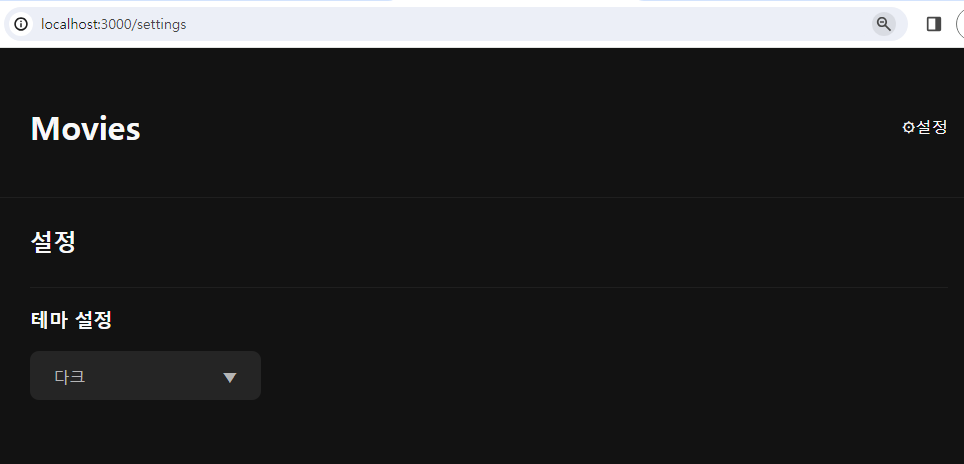
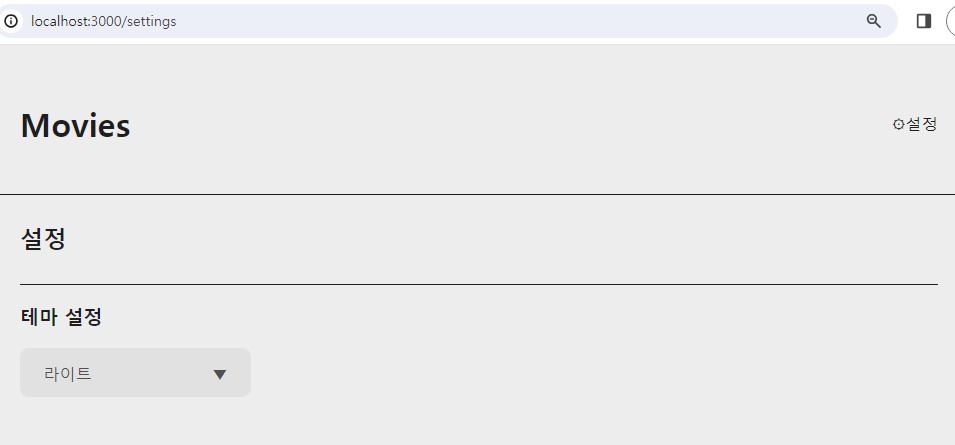
- 테마 설정 페이지에서 테마 변경
CSS
- 실습 때 사용한 파일이 너무 길어 theme를 적용하는 global.css를 제외하고는 정리를 생략했다.
- global.css : 테마 변경 시 적용되는 css 클래스가 저장되어 있다.
html{ font-size: 18px; }

body.dark{ background-color: #121212; }

body.dark,
body.dark a{
	color: #f9f9f9;
}

body.light{	background-color: #ededed; }

body.light,
body.light a{
	color: #1e1e1e;
}

a{ text-decoration: none; }

a:hover { text-decoration: underline; }
lib
-
Axios, Date 변환, React Context 등 라이브러리 및 유틸리티를 위한 파일을 저장한 폴더다.
-
axios : 서버에 요청을 하기 위한 axios config를 생성하는 파일
- codeit의 실습용 서버에 데이터를 요청하여 가져왔다.
import axios from 'axios';

// https://www.codeit.kr/tutorials/55/watchit-api-documentation
const instance = axios.create({
    baseURL : 'https://learn.codeit.kr/api/watchit'
});

export default instance;
- formatedDate : 날짜 형식을
YYYY. MM. dd형식으로 변환해준다.
export default function formatDate(date) {
    // UTF : 세계 표준 시간
    // padStart(n, '0') : n 자리 숫자로 만들고, 빈 자리는 0으로 채움
    const MM = String(date.getUTCMonth()+1).padStart(2, '0'); // Month는 0부터 시작
    const dd = String(date.getUTCDate()).padStart(2, '0');
    const YYYY = String(date.getUTCFullYear());

    return `${YYYY}. ${MM}. ${dd}.`;
}
- ThemeContext : React Context를 만들고, context를 전달할 Provider Component를 반환하는 함수, Context를 사용할 수 있는 함수를 저장한 파일이다.
import { createContext, useContext, useEffect, useState } from "react";

export const ThemeContext = createContext();

export function ThemeProvider({children}) { // _app.js에서 사용하여 모든 Component에서 사용 가능하도록 지정한다.
    const [theme, setTheme] = useState('dark'); // theme를 state로 만들어 변경할 수 있다

    useEffect(()=>{
        document.body.classList.add(theme);

        return () => { // theme가 변경될 때 이전에 존재한 class를 제거하는 clean-up 수행
            document.body.classList.remove(theme);
        }
    }, [theme]);

    return(
	    {/* children 위치에 들어가는 Component들은 모두 theme과 setTheme을 사용할 수 있다. */}
        <ThemeContext.Provider value={{theme, setTheme}}>
            {children}
        </ThemeContext.Provider>
    )
}

// 자식 요소가 사용할 theme context 불러오기 동작
export function useTheme() {
    const themeContext = useContext(ThemeContext);

    if(!themeContext)  // ThemeContext.Provider 내에 존재하지 않는 Component에서 함수 사용 시 에러 처리
        throw new Error('Themecontext 안에서 사용해야 합니다');
    }

    return themeContext;
}
페이지
- app.js : 페이지를 초기화할 때 사용하는 파일이므로, 페이지 전체에 공통 적용되는 요소를 작성한다.
- Header와 Container 요소를 추가하여 전체 페이지에 공통된 헤더를 추가하였다.
- useContext를 사용하여 테마를 변경할 예정이므로 전체 Component에 theme 값을 공통으로 사용하기 위한 ThemeProvider라는 Context를 사용한다.
// /pages/_app.js
import "@/styles/global.css";
import Header from "@/component/Header";
import Container from "@/component/Container";
import { ThemeProvider } from "@/lib/ThemeContext";

export default function App({ Component, pageProps }) {

  return (
    <>
      <ThemeProvider>
        <Header/>
        <Container>
          <Component {...pageProps}/>
        </Container>
      </ThemeProvider>
    </>
  )
}
- 메인 페이지 : 메인 페이지에선 검색창과 영화 전체 목록을 출력한다.
??연산자는 Null 병합 연산자 참고.
// /pages/index.js
import SearchForm from "@/component/SearchForm";
import styles from '@/styles/Home.module.css';
import axios from '@/lib/axios'
import { useEffect, useState } from "react";
import MovieList from "@/component/MovieList";

export default function Home() {

  const [movie, setMovie] = useState([]); // 서버로부터 받아온 movie 데이터를 state로 처리

  // 데이터 요청
  async function getMovies() {
    const res = await axios.get('/movies/'); // axios로 서버에 데이터 요청. baseURL+url 형태로 요청함
    const results = res.data.results ?? []; // 왼쪽 피연산자가 null이 아니면 왼쪽을, null이면 오른쪽 피연산자 반환
    setMovie(results);
  }

  useEffect(()=>{ // 페이지 첫 렌더링때만 영화 목록을 가져옴
    getMovies();
  }, [])

  return (
    <>
      <h1>영화 리스트</h1>
      <SearchForm/>
      {/* MovieList Component에 movie 데이터 전달 */}
      <MovieList className={styles.movieList} movie={movie}/>
    </>
  );
}
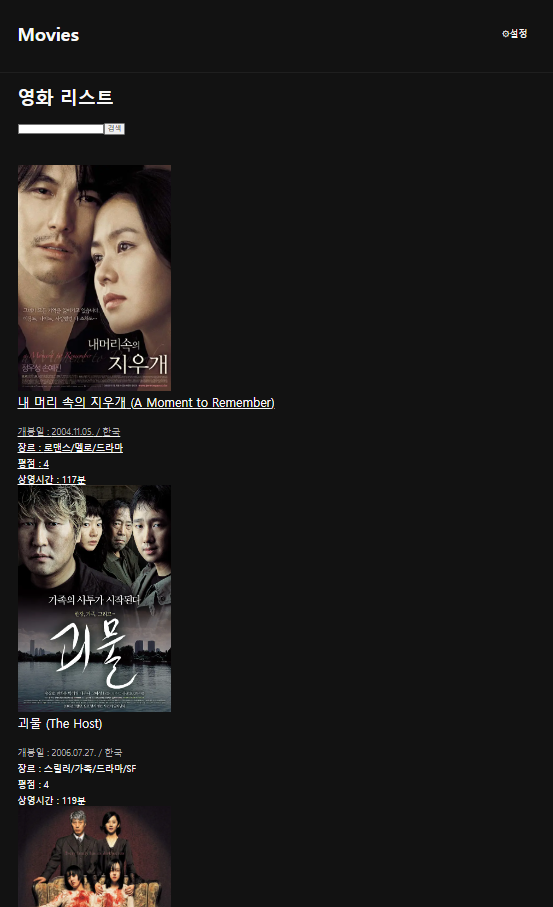
- 검색 페이지 : 검색한 내용을 보여주는 페이지로, 이 페이지에서도 검색이 가능하다.
// /pages/search.js
import SearchForm from "@/component/SearchForm";
import { useRouter } from "next/router";
import styles from '@/styles/Home.module.css';
import { useState, useEffect } from "react";
import axios from "@/lib/axios";
import MovieList from "@/component/MovieList";
import Link from "next/link";

function Search() {

    const router = useRouter(); // 라우터 객체로부터 query를 가져옴
    let {q} = router.query;
    const [movie, setMovie] = useState([]); // movie 데이터를 state로 처리

    // 데이터 요청
    async function getMovies() {
        const res = await axios.get(`/movies?q=${q}`); // 서버에 특정 단어가 제목에 포함된 영화를 검색해서 데이터 저장
        const results = res.data.results ?? [];
        setMovie(results);
    }

    useEffect(()=>{ // query문이 바뀔때마다 데이터를 새로 가져옴
        getMovies();
    }, [q])

    return(
        <>
            <span><Link href="/">홈으로 돌아가기</Link></span>
            <h2>검색 사이트</h2>
            <SearchForm initialValue={q}/>
            <h2>{q} 검색 결과</h2>
            {/* 검색 결과 movie 데이터를 MovieList에 전달 */}
            <MovieList movie={movie}/>
        </>
    )
}

export default Search;
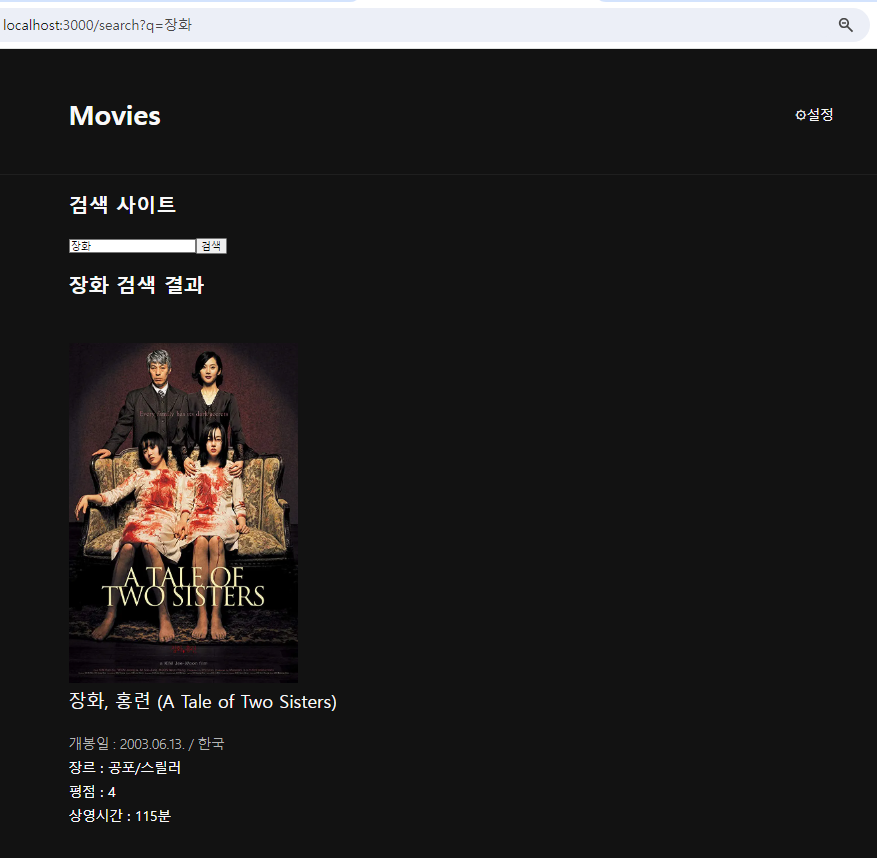
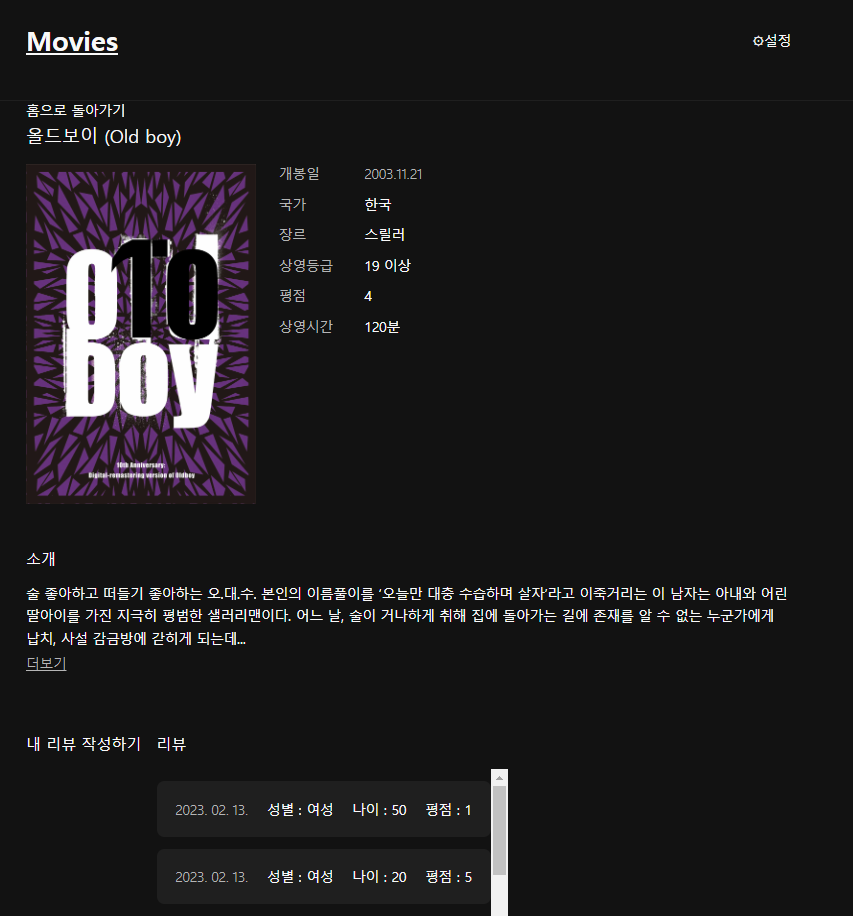
- 영화 상세 페이지 : 검색 혹은 메인 페이지에서 Link로 이동해서 오는 페이지로, 선택한 영화의 상세 정보와 리뷰를 볼 수 있는 페이지이다.
- 다이나믹 라우팅을 사용하기 위해 파일 이름을
[id].js로 설정한다. - 메인 페이지나 검색 결과에서 Link를 통해 상세 페이지로 이동하면 path parameter를
router.query로 받아 해당 id를 서버에서 조회해 데이터를 가져온다.
- 다이나믹 라우팅을 사용하기 위해 파일 이름을
// /pages/movie/[id].js
import { useRouter } from "next/router";
import { useState, useEffect } from "react";
import styles from '@/styles/MovieReviewList.module.css';
import axios from '@/lib/axios';
import Link from "next/link";
import MovieReviewList from "@/component/MovieReviewList";

function Movie() {

    const router = useRouter(); // 라우터 객체에서 query를 가져옴
    let {id} = router.query;

    const [movie, setMovie] = useState(''); // movie 데이터를 state로 처리
    const [movieReviews, setMovieReviews] = useState([]); // movieReview 데이터를 state로 처리

    // 데이터 요청
    async function getMovies() {
        const res = await axios.get(`/movies/${id}`); // 서버에 특정 id의 영화를 조회
        const results = res.data ?? '';
        setMovie(results);
    }

    async function getMovieReviews() {
        const res = await axios.get(`/movie_reviews?movie_id=${id}`); // 서버에 특정 id의 영화 리뷰를 조회
        const results = res.data.results ?? [];
        setMovieReviews(results);
    }

    useEffect(()=>{ // id가 변경될 때마다 영화와 리뷰를 가져옴
        getMovies();
        getMovieReviews();
    }, [id])

    if (!movie) return; // movie 데이터가 없다면 출력을 막음

    return(
        <>
            <span><Link href="/">홈으로 돌아가기</Link></span>
            <h1 className={styles.title}>{movie.title} ({movie.englishTitle})</h1>
            <div>
                <div className={styles.header}>
                    <img className={styles.poster} src={movie.posterUrl} ult={movie.title}></img>
                    <div className={styles.info}>
                        <table className={styles.infoTable}>
                            <tr>
                                <th>개봉일</th>
                                <td className={styles.date}>{movie.date}</td>
                            </tr>
                            <tr>
                                <th>국가</th>
                                <td>{movie.country}</td>
                            </tr>
                            <tr>
                                <th>장르</th>
                                <td>{movie.genre}</td>
                            </tr>
                            <tr>
                                <th>상영등급</th>
                                <td className={styles.age}>{movie.rating} 이상</td>
                            </tr>
                            <tr>
                                <th>평점</th>
                                <td className={styles.starRating}>{movie.starRating}</td>
                            </tr>
                            <tr>
                                <th>상영시간</th>
                                <td>{movie.runningTime}분</td>
                            </tr>
                        </table>
                    </div>
                </div>

                <div className={styles.section}>
                    <h2 className={styles.sectionTitle}>소개</h2>
                    <p className={styles.description}>{movie.description}</p>
                    <span className={styles.readMore}>더보기</span>
                </div>

                <div className={styles.reviewSections}>
                    <div>
                        <h2 className={styles.sectionTitle}>내 리뷰 작성하기</h2>
                    </div>
                    <div>
                        <h2 className={styles.sectionTitle}>리뷰</h2>
                        <MovieReviewList movieReviews={movieReviews} />
                    </div>
                </div>
            </div>
        </>
    )
}

export default Movie;
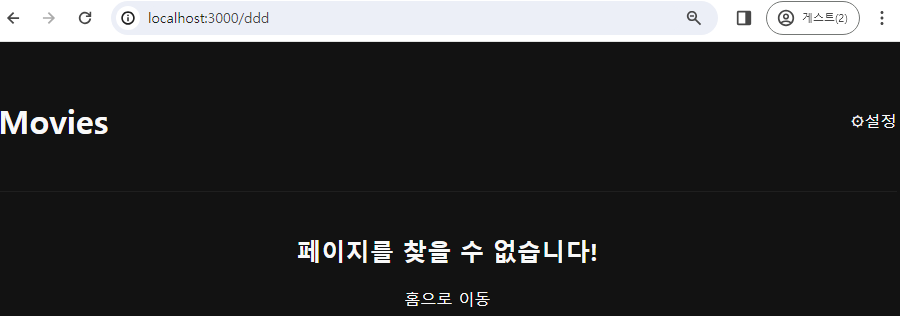
- 404 오류페이지 : 오류 발생 시 이동되는 페이지로, 파일은 pages/ 폴더 내에
404.js로 생성하고, 함수 이름은NotFound()로 설정한다.- 커스텀 에러 페이지 참고.
- 메인 페이지로 돌아가는 링크도 추가한다.
// /pages/404.js
import styles from '@/styles/NotFound.module.css';
import Link from 'next/link';

function NotFound() {
    return(
        <>
            <div className={styles.notFound}>
                <div className={styles.content}>
                    <h2>페이지를 찾을 수 없습니다!</h2>
                    <span><Link className={styles.button} href="/">홈으로 이동</Link></span>
                </div>
            </div>

        </>
    )
}

export default NotFound;
- 설정 페이지 : 테마를 변경할 수 있는 설정을 표시한 페이지다.
import { useTheme, ThemeProvider } from '@/lib/ThemeContext';
import styles from '@/styles/Setting.module.css';
import Dropdown from '@/component/Dropdown';

function Settings() {
	// _app.js에서 Provider가 전달해주는 theme과 setTheme을 사용할 수 있도록 useTheme()을 호출
    const {theme, setTheme} = useTheme();

    return(
        <div>
            <h2 className={styles.title}>설정</h2>
            <section className={styles.section}>
                <h3 className={styles.setctionTitle}>테마 설정</h3>
                {/* Dropdown Component에 theme와 theme 옵션 객체를 전달 */}
                <Dropdown
                    className={styles.input}
                    name="theme"
                    value={theme}
                    options={[
                        {label: '라이트', value: 'light'},
                        {label: '다크', value: 'dark'}
                    ]}
                    onChange={(name, value)=>setTheme(value)} {/* Context에 지정된 useTheme()으로 state 변경*/}
                />
            </section>
        </div>
    )
}

export default Settings;
Component
-
Component들은 pages/ 폴더 밖의 component/ 폴더를 생성하여 해당 폴더에서 파일을 만들고, Component를 사용할 js 파일에서 import 하는 방식으로 사용했다.
-
Header Component : 모든 페이지에 공통으로 들어갈 헤더 Component다.
- app.js에서 Header Component를 추가해 모든 페이지에 헤더 설정을 적용할 수 있다.
// /component/Header.js
import Link from 'next/link';
import styles from '@/styles/Header.module.css';
import Container from './Container';

function Header() {
    return (
    <header className={styles.header}>
        <Container className={styles.container}>
            <Link className={styles.logo} href="/">Movies</Link>
            <Link className={styles.setting} href="/setting">⚙설정</Link>
        </Container>
    </header>
    );
}

export default Header;
- Container Component : Header Component에 들어가며, Header와 마찬가지로 app.js에 추가해 스타일 적용을 위해 사용되었다.
// /component/Container.js
import styles from '@/styles/Container.module.css';

function Container({ className = '', children }) {
	// className에 styles.container를 원래 있던 className과 함께 추가
    const classNames = `${styles.container} ${className}`;

    return (
        <div className={classNames}>{children}</div>
    )
}

export default Container;
- 검색창 Component : form 태그를 사용하여 검색어를 받고, 검색어를
router.push()메소드를 사용해 search 페이지로 이동하도록 작성한다.
// /component/SearchForm.js
import { useRouter } from "next/router";
import { useState } from "react";

function SearchForm({initialValue=''}) { // 초기값을 지정해서 state에 적용

    const [movie, setMovie] = useState(initialValue); // movie 데이터를 state로 처리
    const router = useRouter();

    function handleChange(e) {
        setMovie(e.target.value); // input의 내용이 변경되면 해당 내용을 movie에 저장
    }

    function handleSubmit(e) {
        e.preventDefault(); // 페이지 새로 고침을 막음
        router.push(`/search?q=${movie}`); // search 페이지로 query string과 함께 페이지 이동
    }

    return(
        <form onSubmit={handleSubmit}>
            <input type="search" name="movie" value={movie} onChange={handleChange}></input>
            <button type="submit">검색</button>
        </form>
    )
}

export default SearchForm;
- 영화 목록 Component : 메인 페이지와 검색 페이지에서 영화 목록을 출력하기 위한 Component다.
// /component/MovieList.js
import styles from '@/styles/MovieReviewList.module.css';
import Link from 'next/link';

function MovieList({movie}) { // movie 데이터를 전달받음
    return(
        <ul className={styles.movieReview}>
        {
            movie.map((el)=>{ // movie 데이터 배열 내 요소를 출력하기 위한 map()
                return(
                <li key={el.id}>
	                {/* movie/id로 상세 페이지 이동 */}
                    <Link href={`/movie/${el.id}`}>
                        <div>
                            <img className={styles.poster} src={el.posterUrl} ult={el.title} width="300px;"></img>
                            <div className={styles.info}>
                                <h2 className={styles.title}>{el.title} ({el.englishTitle})</h2>
                                <div className={styles.date}>개봉일 : {el.date} / {el.country}</div>
                                <div>장르 : {el.genre}</div>
                                <div className={styles.starRatingContainer}>
                                    <span className={styles.starRating}>평점 : {el.starRating}</span>
                                </div>
                                <div>상영시간 : {el.runningTime}분</div>
                            </div>
                        </div>
                    </Link>
                </li>
                )
            })
        }
        </ul>
    )
}

export default MovieList;
- 리뷰 목록 Component : 영화 상세보기 페이지에서 해당 영화의 리뷰 목록을 출력하는 Component다.
// /component/MovieList.js
import styles from '@/styles/MovieReviewList.module.css';
import formatDate from '@/lib/formatedDate'

const labels = { // 리뷰 성별 구분용
    gender: { male: '남성', female: '여성'}
}

function MovieReview({movieReview}) { // MovieReviewList로부터 movieReview 데이터를 전달받음
    return(
        <li className={styles.movieReview}>
	        {/* 리뷰 작성일을 Date 함수로 처리*/}
            <div className={styles.date}>{formatDate(new Date(movieReview.createdAt))}</div>
            <div>성별 : {labels.gender[movieReview.sex]}</div>
            <div>나이 : {movieReview.age}</div>
            <span className={styles.starRating}>평점 : {movieReview.starRating}</span>
        </li>
    )
}

export default function MovieReviewList({movieReviews}) { // [id].js로부터 조회된 리뷰 데이터를 받는다

    if (!movieReviews || movieReviews.length == 0) { // 데이터가 없거나 길이가 0인 경우
        return (
            <div className={styles.empty}>아직 작성된 리뷰가 없습니다.</div>
        )
    }

    return(
        <ul className={styles.movieReviewList}>
            {
                movieReviews.map((el)=>{ // 리뷰 데이터를 출력하기 위해 MovieReview에 데이터 전달
                    return(
                        <MovieReview key={el.id} movieReview={el}/>
                    )
                })
            }
        </ul>
    )
}
- 드롭다운 Component : 테마를 변경할 수 있는 dropdown을 제공하는 Component다.
?.연산자는 Optional Chaining 참고.- 드롭다운을 눌러서 열린 상태로 웹 페이지의 다른 곳을 누르면 자동으로 드롭다운을 닫게 되어있다.
import { useEffect, useState, useRef } from 'react';
import styles from '@/styles/Dropdown.module.css';

export default function Dropdown({
  className, name, value, options, onChange
}) {
  // dropdown이 열려있는지 확인하는 state
  const [isOpen, setIsOpen] = useState(false);
  const inputRef = useRef(null); // 변경되어도 리렌더링 발생 안하는 상수. 기본값 null이며 요소 참조값

  function handleInputClick() { // 클릭하면 dropdown이 열린 상태로 변경
    setIsOpen((prevIsOpen) => !prevIsOpen); // 현재의 상태를 변경하도록 callback 적용(더 안전함)
  }

  function handleBlur() { // 포커스 벗어나면 닫히게 설정, 키보드 이벤트까지 처리하기 위함
    setIsOpen(false);
  }

  useEffect(() => {
    function handleClickOutside(e) { // 드롭다운 외부 클릭 처리
      // ?. : optional chaining operator
      // 참조의 중간에 있는 속성이나 메서드가 null 또는 undefined인 경우에도 오류를 방지하고 그 부분의 평가를 중단
      const isInside = inputRef.current?.contains(e.target); // 참조하고 있는 값에 이벤트 타겟(드롭다운)을 포함하고 있는지 확인
      if (!isInside) { // 내부를 클릭한게 아니면 드롭다운을 포함하지 않으므로 열리지 않은 상태로 설정
        setIsOpen(false);
      }
    }

    window.addEventListener('click', handleClickOutside); // 웹페이지 클릭 시 이벤트 콜백에 드롭다운 외부 클릭 처리 추가
    return () => { // clean-up 등록
      window.removeEventListener('click', handleClickOutside);
    };
  }, []);

  // className에 기존 className과 styles.input, 그리고 열린 상태일 때 적용되는 className인 styles.opened를 적용
  const classNames = `${styles.input} ${ isOpen ? styles.opened : ''} ${className}`;
  const selectedOption = options.find((option) => option.value === value); // 선택한 옵션 찾기

  return (
    // div를 클릭하면 보이고, 다시 누르면 안보이게 설정함
    // inputRef.current에 드롭다운 div 요소의 정보가 저장된다
    <div className={classNames} tabIndex="0" onClick={handleInputClick} onBlur={handleBlur} ref={inputRef}>
      {selectedOption.label} {/* 선택한 옵션을 표시 */}
      <span>▼</span>
      <div className={styles.options}>
        {
          options.map((option) => { // 테마 옵션 목록을 출력
            const selected = value === option.value;
            {/* className에 styles.option의 스타일과 선택된 항목의 경우 styles.selected를 적용 */}
            const className = `${styles.option} ${ selected ? styles.selected : '' }`;
            return (
              <div className={className} key={option.value}
                onClick={() => onChange(name, option.value)}>
                {option.label}
              </div>
            );
          })
        }
      </div>
    </div>
  );
}