MySQL, Node Express, React 연결
✒️ 2025-05-28 10:25 내용 수정
- MySQL(DB), Node.js, Express.js(Backend), React(Frontend)를 연결하여 DB로부터 데이터를 조회해 화면에 표시하는 과정을 수행한다.
MySQL, Node.js와 Express.js, React를 연결하는 예시를 찾아봤을 때 axios를 사용하는 예제가 많았는데, 이를 먼저 사용하다가 잘 진행되지 않아 fetch로 진행했다.axios 사용 시 CORS문제와 package.json에 "proxy"를 추가했음에도 axios 객체로 연결할 때 url 관련 문제를 제대로 해결하지 못했다.
- Sequelize를 사용하는 대신 간단하게 mysql2 라이브러리를 설치하여 직접 query문을 작성하여 간단한 조회 동작을 수행했다.
- 각 개발 환경과 상황에 따라 연결 방법은 다를 수 있으므로, 여러 방법을 시도하면서 잘 연결되거나 사용하기 편한 방법을 골라서 진행하는 것이 좋을 것 같다.
- 20240311 추가 : 수업을 들으면서 Next.js를 시작했는데, Next.js가 서버 사이드 렌더링을 위한 프레임워크이기에 이 부분에 대한 내용을 넘긴 듯 했다.
- 20240416 추가 : 프로젝트를 진행하면서 오류가 발생한 부분을 수정하고 프로젝트 구조를 다시 맞추어 정상 작동하는 것을 확인했다.
환경설정
- 설정 과정은 다음 사이트를 참고했다.
- concurrently로 React(Client)와 Express(Server) 동시 실행 참고 자료 : Mehak Saini Creating basic express server and react client and the use of concurrently
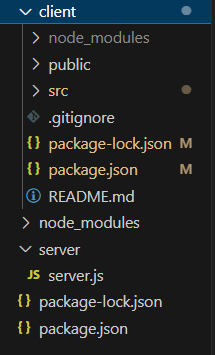
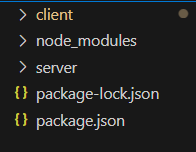
- 프로젝트 폴더를 먼저 생성하고, 하위 폴더로 server 폴더와 client 폴더를 생성한다.
project/
	- server/
	- client/
-
프로젝트 폴더에서
npm init으로 서버 설정을 먼저 진행한다.- 프로젝트 폴더에 package.json이 생성된다.
-
서버에 필요한 라이브러리를 설치한다.
- express : express.js 사용을 위한 라이브러리
- cors : CORS 체재 허용 설정을 위한 미들웨어
- concurrently : 서버와 클라이언트를 동시에 실행하기 위한 script 구문 설정
npm install express cors concurrently
# 글로벌 설정으로 nodemon을 설치하지 않을 경우 명령어가 작동하지 않을 수도 있다.
su npm install --g nodemon
- 프로젝트 폴더 하위의 server 폴더에 서버 설정 파일인 server.js 파일을 만든다.
const express = require('express');
const app = express();

const PORT = 10000;

app.listen(PORT, () => {
    console.log(`http://localhost:${PORT}`);
});

app.get("/", (req, res) => {
    res.send("<h1>React server test</h1>");
});
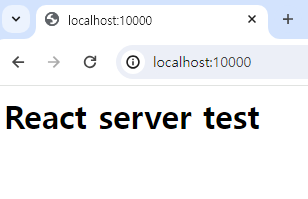
nodemon ./server/server.js로 서버가 실행되는지 확인한다.
-
VSC 터미널에서 프로젝트 폴더 하위의 client 폴더로
cd client를 사용하여 이동한 후,npx create-react-app .으로 React 프로젝트를 설치한다.npx create-react-app .에서.은 현재 폴더에 React 프로젝트 설치를 의미한다.
-
client 폴더에 있는 상태로
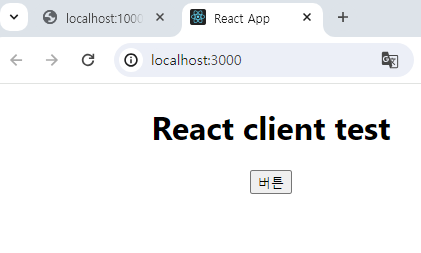
npm start를 입력하여 클라이언트가 작동되는지 확인한다.
- client 폴더에 있는 package.json의
scripts항목에 proxy 설정을 위해"proxy" : "서버도메인"을 추가한다.- proxy 설정을 안하고 진행할 경우 CORS 에러가 발생한다.
{
  "name": "client",
  "version": "0.1.0",
  "private": true,
  "dependencies": {
    "@testing-library/jest-dom": "^5.17.0",
    "@testing-library/react": "^13.4.0",
    "@testing-library/user-event": "^13.5.0",
  // 중략
  },
  "scripts": {
    "start": "react-scripts start",
    "build": "react-scripts build",
    "test": "react-scripts test",
    "eject": "react-scripts eject"
  },
// 중략
  "proxy": "http://localhost/10000"
}
- VSC 터미널에서
cd ..를 입력해서 프로젝트 폴더로 이동하고, 프로젝트 폴더의 package.json에서script부분에 server와 client 실행 설정, dev 실행 설정을 추가한다.- 클라이언트와 서버 실행 시 서로 다른 명령어를 사용했기에 이를 기반으로 설정해준다.
# server(express) 실행 시 사용했던 명령어
node server.js
# 또는
nodemon server.js

# client(react) 실행 시 사용했던 명령어
npm start
- 프로젝트 폴더의 package.json 내의
script설정 후npm run dev를 입력하면 서버와 클라이언트가 모두 실행될 수 있도록 dev 항목을concurrently로 작성한다.
// script 부분
"scripts": {
	"test": "echo \"Error: no test specified\" && exit 1",
	"server": "nodemon ./server/server.js", // 서버 실행 명령어
	"client": "npm start --prefix client", // client 내의 package.json에 있는 "script" : "start"
	"dev": "concurrently \"npm run server\" \"npm run client\""
}
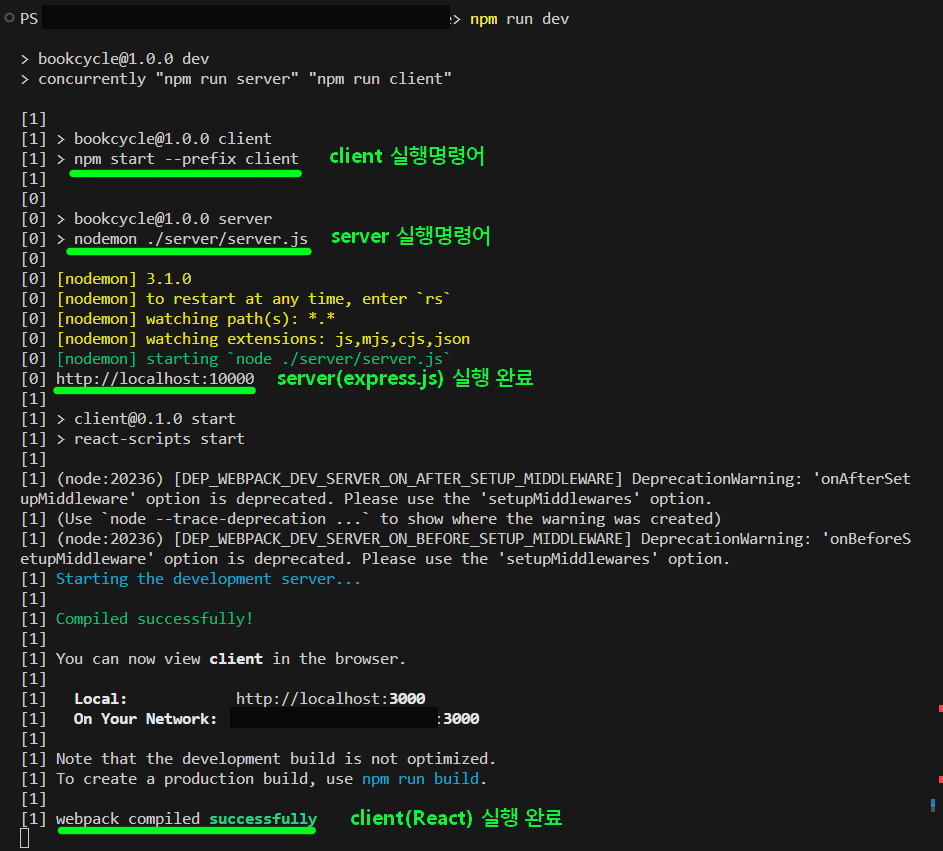
- 설정이 완료되면 프로젝트 폴더 위치에서
npm run dev를 입력해 서버와 클라이언트가 모두 작동하는지 확인한다.
- 설정을 완료하면 프로젝트 폴더의 구조가 아래 사진과 같다.