JSP에서 Ajax로 데이터 표시하기
✒️ 2025-04-17 15:25 내용 수정
JSP에서 Ajax로 데이터 표시하기
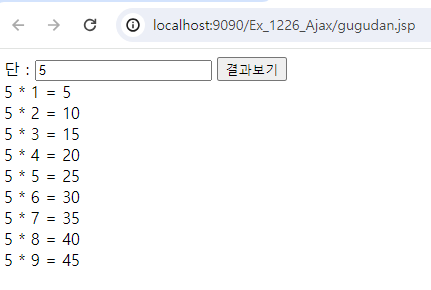
- 웹 페이지에서 숫자를 입력하고 버튼을 누르면 구구단이 출력되도록 작성한다.
1. XMLHttpRequest 객체
-
HttpRequest.js를 사용하여 XMLHttpRequest 객체를 생성 및 전송하는 메소드를 사용한다.
- 백그라운드에서 해당 객체로 서버와 통신
-
전체 요청 양식 (HttpRequest.js)
var xhr = null;

function createRequest() {
	if (xhr != null) {
		return;
	}
	if (window.ActiveXObject) {
		xhr = new ActiveXObject("Microsoft.XMLHTTP"); // IE 환경
	} else {
		xhr = new XMLHttpRequest(); // 기타 브라우저 환경
	}
}

function sendRequest(url, param, callback, method) {

	// HttpRequest 생성
	createRequest();

	// 전송 타입 구분
	var httpMethod = (method != 'POST' && method != 'post') ? 'GET' : 'POST';

	// 파라미터 구분
	var httpParam = (param == null || param == '') ? null : param;

	// 접근 url
	var httpURL = url;

	// 요청 방식이 GET이고 전달할 파라미터가 있다면 새 url 경로 제작
	if (httpMethod == 'GET' && httpParam != null) {
		httpURL = httpURL+'?'+httParam;
	}

	// 서버로 보낼 Ajax 요청 형식
	xhr.open(httpMethod, httpURL, true);

	// requestHeader 설정 : Content-Type 지정
	xhr.setRequestHeader("Content-Type", "application/x-www-form-urlencoded");

	// 작업이 완료된 후 호출할 callback 메소드 지정
	xhr.onreadystatechange = callback;

	// Ajax 요청을 서버로 전달
	xhr.send(httpMethod == 'POST' ? httpParam : null);
}
2. 숫자 입력 및 전송 JSP
<%@ page language="java" contentType="text/html; charset=UTF-8"
    pageEncoding="UTF-8"%>
<!DOCTYPE html>
<html>
<head>
<meta charset="UTF-8">
<title>Insert title here</title>
	<!-- 작성해둔 HttpRequest.js 파일 가져오기 -->
	<script src="js/HttpRequest.js"></script>

	<script type="text/javascript">
		function send() {
			var dan = document.getElementById("dan").value;

			var url = "gugudan_ajax.jsp";
			var param = "dan="+dan; // "GET"으로 전송하기 위해

			// HttpRequest.js의 function sendRequest(url, param, callback, method)
			sendRequest(url, param, resultFn, "GET");
		}

		// 작업이 완료된 후 호출할 callback 메소드
		function resultFn() {
			//alert("call back"); // 호출 확인
			//console.log(xhr.readyState + "/" + xhr.status); // state 확인

			if(xhr.readyState == 4 && xhr.status == 200) {
				// 도착한 데이터 읽어오기
				var data = xhr.responseText; // 최종 결과값을 갖고 돌아옴
				//alert(data); // 데이터 확인해보기
				document.getElementById("disp").innerHTML = data;
			}
		}
	</script>
</head>
<body>
	단 : <input id="dan">
	<input type="button" value="결과보기" onclick="send()">
	<div id="disp"></div>
</body>
</html>
3. 데이터 처리용 JSP
<%@ page language="java" contentType="text/html; charset=UTF-8"
    pageEncoding="UTF-8"%>
<%
	// 다른 JSP에서 전송한 정보
	int dan = Integer.parseInt(request.getParameter("dan"));

	String str = "";

	for (int i = 1; i <= 9; i++) {
		str += dan+" * "+i+" = "+(dan*i)+"<br>";
	}
%>
<!DOCTYPE html>
<html>
<head>
<meta charset="UTF-8">
<title>Insert title here</title>
</head>
<body>
	<!-- xhr.responseText로 가져올 내용 -->
	<%= str %>
</body>
</html>
- 웹 페이지 새로 고침 없이 입력된 숫자의 구구단이 출력된다.
- 물론 바로 javascript function으로 한 JSP 안에 구구단을 출력할 수 있지만, 다른 작업으로 인해 서버와의 요청이 오갈 때의 상황을 실습한 것.
- 물론 바로 javascript function으로 한 JSP 안에 구구단을 출력할 수 있지만, 다른 작업으로 인해 서버와의 요청이 오갈 때의 상황을 실습한 것.