EL(Expression Language)
✒️ 2025-05-26 10:08 내용 수정
Java코드를 사용했던 곳에서 사용 가능한 식을 표현하는 언어
- 참고 자료 : opentutorials JSP/서블릿 훑어보기 EL, Leica's JSP EL 표현식 문법과 사용 방법
- JSP의 scriptlet(
<% %>)이나 표현문(<%= %>)을 사용하던 부분을 훨씬 간단하게 사용할 수 있다.- JSP 태그#스크립트 태그 참고.
표현
${표현식}으로 사용하며, 데이터 이름 하나만 구성되거나 연산자가 포함된다.- 식에 포함된 데이터 이름은 Attribute의 이름으로 해석됨
- Attribute : Attribute과 연관된 메서드를 통해 저장되고 관리되는 데이터
| 타입 | 형태 |
|---|---|
| 문자열 | ${"문자열"} |
${'문자열'} |
|
| 정수 | ${10} |
| 부동소수점 | ${1.28} |
| Boolean | ${true}, ${false} |
| null | ${null} , 출력 시 빈 문자열로 출력됨 |
객체와 메서드
1. 영역 객체
| 영역객체 | 설명 |
|---|---|
| pageContext | JSP의 PageContext 객체. 1개의 JSP 페이지의 시작부터 끝까지 유효 |
| 페이지 당 1개만 존재하고, 해당 JSP 내부에서만 접근 가능함 | |
| request | ServletRequest 객체. 1개 이상의 JSP 페이지에서 요청의 시작부터 응답까지 유효 |
| 요청마다 1개 객체가 존재하고, 다른 JSP로 전달할 수 있음 | |
| session | HttpSession 객체. n개의 JSP 페이지에서 session의 시작부터 종료까지 유효(로그인~로그아웃) |
| 클라이언트마다 1개 존재함 | |
| application | context 전체에서 Web application의 시작부터 종료까지 유효 |
| context 내부 어디에서나 접근 가능하고, 모든 클라이언트가 공유하며, context 당 1개 존재함 |
2. 내장 객체
- 내부적으로 변수 선언과 초기화 작업이 자동으로 되는 객체다.
- JSP 내장 객체 참고.
- EL 식 안에 데이터 이름의 해석은 page -> request -> session -> application 영역 순서대로 진행된다.
- 특정 영역의 객체를 가져올 때는 pageScope, requestScope, sessionScope, applicationScope 객체들을 사용한다.
${내장객체이름.변수명},${내장객체이름.객체명}으로 원하는 값을 불러올 수 있다.- 키 값(변수명, 객체명)은 중복되지 않도록 설정하는 것이 좋다.
- 영역을 생략했을 때 (
${키값}) pageScope -> requestScope -> sessionScope -> applicationScope 순으로 참조한다.
${pageScope.변수명};
${변수명};
| 내장객체 | 설명 |
|---|---|
| pageScope | pageContext에 등록된 데이터의 이름과 값을 저장한 객체 |
| 한 번의 클라이언트의 요청에 대해 하나의 JSP 페이지가 호출되며 대응되기 때문에 page 영역에서 객체는 하나의 페이지 내에서만 공유됨 | |
| requestScope | HttpServletRequest에 등록된 데이터의 이름과 값을 저장한 객체 |
| 같은 request 영역에서 두 개의 페이지가 같은 요청을 공유할 수 있기 때문에 객체를 여러 페이지 내에서 공유할 수 있음 | |
| 가장 많이 사용하며, 페이지 모듈화에 사용됨 | |
| sessionScope | HttpSession에 등록된 데이터의 이름과 값을 저장한 객체 |
| 클라이언트 1개 당 session 객체 1개가 생성되므로 같은 웹 브라우저 내에서 요청되는 페이지들은 같은 객체를 공유할 수 있음 | |
| requestScope 다음으로 많이 사용하는 영역 | |
| applicationScope | ServletContext에 등록된 데이터의 이름과 값을 저장한 객체 |
| 하나의 웹 어플리케이션 당 1개의 application 객체가 생성되므로 같은 웹 어플리케이션에서 요청되는 페이지들은 같은 객체를 공유한다. | |
| param | QueryString의 이름과 값을 저장한 map 객체(<form> 요소를 통해 입력된 데이터를 저장) |
| paramValues | 같은 이름으로 전달된 QueryString의 이름과 값들을 저장한 map 객체 |
| initParam | Web application에서 저장한 초기 파라미터의 이름과 값을 저장한 map 객체 |
| header | 요청 정보 헤더의 정보를 이름과 값으로 저장한 map 객체 |
| cookie | 요청을 보낸 클라이언트의 쿠키의 이름과 값을 저장한 map 객체 |
3. 메서드
| 메서드 | 설명 |
|---|---|
setAttribute(String name, Object value) |
지정된 이름에 해당하는 값으로 저장 |
Object getAttribute(String name) |
지정된 이름의 값을 반환 |
removeAttribute(String name) |
지정된 이름의 값을 제거 |
Enumeration getAttributeNames() |
해당 영역 객체에 저장된 모든 값의 이름을 반환 |
<%@page import="java.util.HashMap"%>
<%@page import="java.util.Map"%>
<%@ page language="java" contentType="text/html; charset=UTF-8"
    pageEncoding="UTF-8"%>
<%

	String str = "EL을 테스트합니다.";

	// pageScope 영역에 str을 넣는다.
	pageContext.setAttribute("msgPage", "pageScope 영역에 저장됨");

	// requestScope 영역에 값을 넣는다.
	request.setAttribute("msgRequest", "requestScope 영역에 저장됨");

	// sessionScope 영역에 값을 넣는다.
	session.setAttribute("msgSession", "sessionScope 영역에 넣음");
%>

<!DOCTYPE html>
<html>
<head>
<meta charset="UTF-8">
<title>Insert title here</title>
</head>
<body>
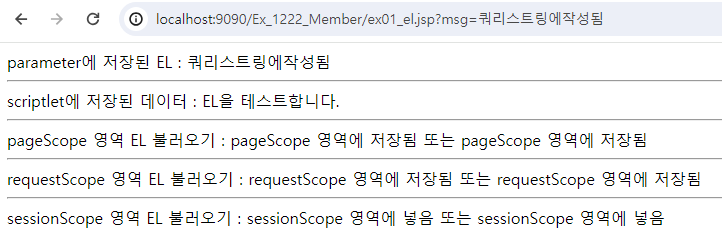
	parameter에 저장된 EL : ${param.msg}<br>
	<hr>
	scriptlet에 저장된 데이터 : <%= str %><br>
	<hr>
	pageScope 영역 EL 불러오기 : ${pageScope.msgPage} 또는 ${msgPage} <br>
	<hr>
	requestScope 영역 EL 불러오기 : ${requestScope.msgRequest} 또는 ${msgRequest}<br>
	<hr>
	sessionScope 영역 EL 불러오기 : ${sessionScope.msgSession} 또는 ${msgSession}<br>
</body>
</html>
데이터 접근 방법
<%
	Map<String, Integer> map = new HashMap<>();

	map.put("key1", 1);
	map.put("key2", 2);
	map.put("key3", 3);

	// map을 Scope 영역 중 한 곳에 넣어야 함
	request.setAttribute("map", map);
%>

<body>
	<!-- 1번 -->
	${pageScope.attribute.get("key1")}

	<!-- 2번 -->
	${attribute.get("key1")}

	<!-- 3번 -->
	${attribute['key1']}
	${attribute["key1"]}

	<!-- 4번 -->
	${attribute.key1} <!-- 가장 편하고 많이 사용함 -->
</body>
<%@page import="java.util.ArrayList"%>
<%@page import="Test.Test"%>
<%@page import="java.util.List"%>
<%@page import="java.util.HashMap"%>
<%@page import="java.util.Map"%>
<%@ page language="java" contentType="text/html; charset=UTF-8"
    pageEncoding="UTF-8"%>

<%
	// Map의 key와 value를 넣고 requestScope 영역에 추가
	Map<String, Integer> map = new HashMap<>();

	map.put("key1", 1);
	map.put("key2", 2);
	map.put("key3", 3);

	// requestScope 영역에 map 추가
	request.setAttribute("map", map);

	// 객체를 List에 저장하고 requestScope 영역에 추가
	Test apple = new Test();
	apple.setIndex(1);
	apple.setName("사과");

	Test banana = new Test();
	banana.setIndex(2);
	banana.setName("바나나");

	Test berry = new Test();
	berry.setIndex(3);
	berry.setName("딸기");

	// List에 객체 저장
	List<Test> list = new ArrayList<>();
	list.add(apple);
	list.add(banana);
	list.add(berry);

	request.setAttribute("list", list);
%>
<!DOCTYPE html>
<html>
<head>
<meta charset="UTF-8">
<title>Insert title here</title>
</head>
<body>
	<h2>map의 데이터 가져오기</h2>

	key1 : ${requestScope.map.get("key1")} <br>
	key2 : ${map.get("key2")} <br>
	key3 : ${map['key3']} 또는 ${map["key3"]} <br>
	key1 : ${map.key1} <br>

	<h2>list의 데이터 가져오기</h2>

	${list[0].index} apple : ${list[0].name} <br>
	${list[1].index} banana : ${list[1].name} <br>
	${list[2].index} berry : ${list[2].name} 또는 ${list[2]['name']}
</body>
</html>

연산자
| 종류 | 연산자 | 기능 |
|---|---|---|
| 최고연산자 | () | 가장 먼저 연산 |
| 대괄호, 마침표연산자 | [], . | 집합 데이터에 있는 한 항목 선택 |
| 산술연산자 | +, -, /, %, div(/), mod(%) | 사칙연산, 나머지연산 |
| 비교연산자 | >, <, >=, <=, ==, !=, lt(<), gt(>), le(<=), ge(>=), eq(==), ne(!=) | 두 값의 크기 비교 |
| 논리연산자 | &&, ||, !, and(&&), or(||), not(!) | 논리의 연산 |
| 조건연산자 | 조건식 ? A : B | 조건식의 결과에 따라 A(true)와 B(false)를 선택 |
| Empty 연산자 | empty | 데이터의 존재 유무 여부 확인 |
산술 연산자
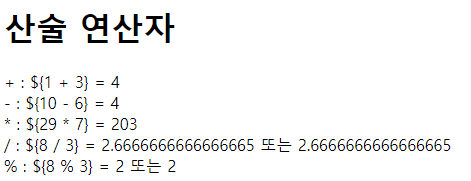
<h1>산술 연산자</h1>
+ : \${1 + 3} = ${1 + 3} <br>
- : \${10 - 6} = ${10 - 6} <br>
* : \${29 * 7} = ${29 * 7} <br>
/ : \${8 / 3} = ${8 / 3} 또는 ${8 div 3} <br>
% : \${8 % 3} = ${8 % 3} 또는 ${8 mod 3} <br>
비교 연산자
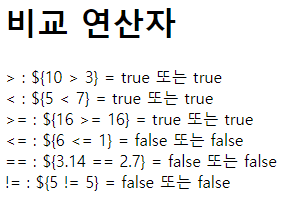
<h1>비교 연산자</h1>

> : \${10 > 3} = ${10 > 3} 또는 ${10 gt 3} <br>
< : \${5 < 7} = ${5 < 7} 또는 ${5 lt 7} <br>
>= : \${16 >= 16} = ${16 >= 16} 또는 ${16 ge 16} <br>
<= : \${6 <= 1} = ${6 <= 1} 또는 ${6 le 1} <br>
== : \${3.14 == 2.7} = ${3.14 == 2.7} 또는 ${3.14 eq 2.7} <br>
!= : \${5 != 5} = ${5 != 5} 또는 ${5 ne 5} <br>
논리 연산자
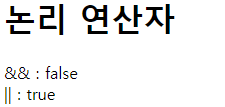
<h1>논리 연산자</h1>
&& : ${ 3 > 2 && 10 < 4 } <br>
|| : ${ 3 > 2 || 10 < 4 } <br>
조건 연산자
<h1>조건 연산자</h1>
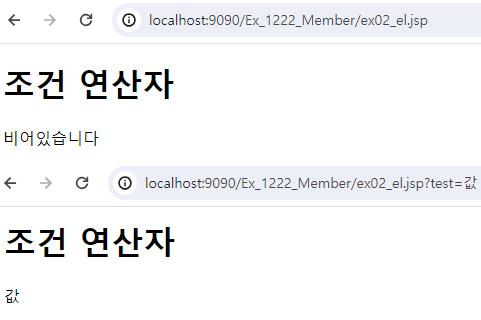
${empty param.test ? '비어있습니다' : param.test} <br>