문자열 인코딩 문제
✒️ 2025-04-29 20:25 내용 수정
문제 상황
- 유투브 클론코딩 팀 프로젝트를 진행하면서 검색 기능을 구현하였다.
- 검색은
form의input에서 입력을 하고, 검색 결과를search.html에서 보여준다. - 검색 페이지의 URL은 아래와 같은 형식으로 작성했다.
http://localhost/html/search.html?query=동물
- 이 때 웹 브라우저의 상단에는
query=동물로 표시되어 이를 그대로 사용하는 것이라 생각하고 Javascript 내에서 검색어 키워드를 비교하던 중 비교 조건이 제대로 걸리지 않는 것을 확인했다.window.location의search로 가져온 검색어 키워드를 비교하는 부분에서 문제가 발생했다.
// 'query=동물'이라고 생각했으나 실제로는 인코딩된 문자열
const query = window.location.search.split('=')[1]; // 주소창이 ?query=키워드 형식

//... 중략
const str = "동물 곤충 사람";
const isContained = str.includes(query); // false
원인 분석
query에 키워드는 제대로 잡혀 있었기에 키워드와 대상 문자열을 비교하는 과정에서 문제가 발생한 것으로 보인다.- 문제는
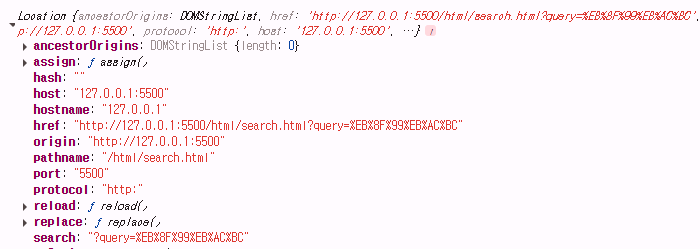
window.location.search로 추출한 키워드가 영어가 아닌 한글일 경우URLEncode된 상태이기에 주소창에서 보는 것과 다르게 아래와 같은 상황이었다.
http://localhost/html/search.html?query=%EB%8F%99%EB%AC%BC
console.log로window.location을 출력해보면search부분의 한글로 입력 받았던 부분이 인코딩 되어 다른 형식으로 나타난 것을 볼 수 있다.
console.log(window.location);
해결 방법
- 인코딩된 문자열을 복호화(디코딩)해야 한다.
- 이를 위해
URLSearchParams인터페이스를 사용하여 URL의 쿼리 문자열을 객체로 만들어 인터페이스가 제공하는 유틸리티 메서드로 디코딩을 진행했다.- 참고 자료 : mdn web docs URLSearchParams
// URLSearchParams 객체를 window.location.search로 생성
const params = new URLSearchParams(window.location.search);

// param을 query string으로 쓸 수 있는 문자열 형식으로 반환
console.log(params.toString())

// params의 모든 키(key)를 콘솔로 출력
for (const key of params.keys()) {
    console.log(key);
}

// params의 모든 값(value)을 출력
for (const value of params.values()) {
    console.log(value);
}
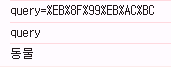
params의key이름이query인 값(value)를 가져와 복호화를 진행하면 원래 입력받은 한글로 대상 문자열과 비교가 제대로 진행된다.
const query = decodeURIComponent(params.get("query") || "");

// ... 중략

const str = "동물 곤충 사람";
const isContained = str.includes(query); // true
기타 비교 조건
참고 자료 : mdn web docs String.incudes(), 정규 표현식
1. 공백 차이
- JavaScript의
includes()는 대상 문자열에서 비교할 문자열이 존재한다면true를 반환한다. - 하지만 띄어쓰기에 따라 해당 키워드를 포함하고 있는 것처럼 보여도 조건에 걸리지 않을 수 있다.
const query = "서울역";
const str = "서울 역에서 만난 사람들";

console.log(videoTitle.includes(searchQuery)); // false
- 이 경우 "서울역"을 검색어로 넣었지만 대상 문자열에는 "서울 역" 혹은 "서울" 포함 여부를 확인하기에
str의query포함 여부는false가 된다. - 따라서 공백 제거를 수행하면
str에는 "서울역"을 포함하게 되므로 포함 관계는true가 된다.- 공백 제거엔 정규 표현식을 사용하였다.
const query = "서울역";
const str = "서울 역에서 만난 사람들";

// 공백 제거
const normalizedQuery = searchQuery.replace(/\s+/g, '');
const normalizedTitle = videoTitle.replace(/\s+/g, '');

console.log(normalizedTitle.includes(normalizedQuery)); // true
2. 대소문자 구분
- JavaScript의
includes()는 대소문자를 구별하기 때문에 구분 없이 포함 여부를 확인해야 한다면 두 문자열을 모두 대문자 혹은 소문자로 바꾼 후 포함 여부를 확인한다.
let query = "test";
let str = "TEST";

console.log(str.includes(query)); // false

// 모두 소문자로 통일
query = query.toLowerCase();
str = str.toLowerCase();

console.log(str.includes(query)); // true