offsetWidth, offsetHeigth, clientWidth, clientHeight
✒️ 2025-05-08 21:11 내용 수정
참고 자료 : mdn web docs DOM Determining the dimensions of elements
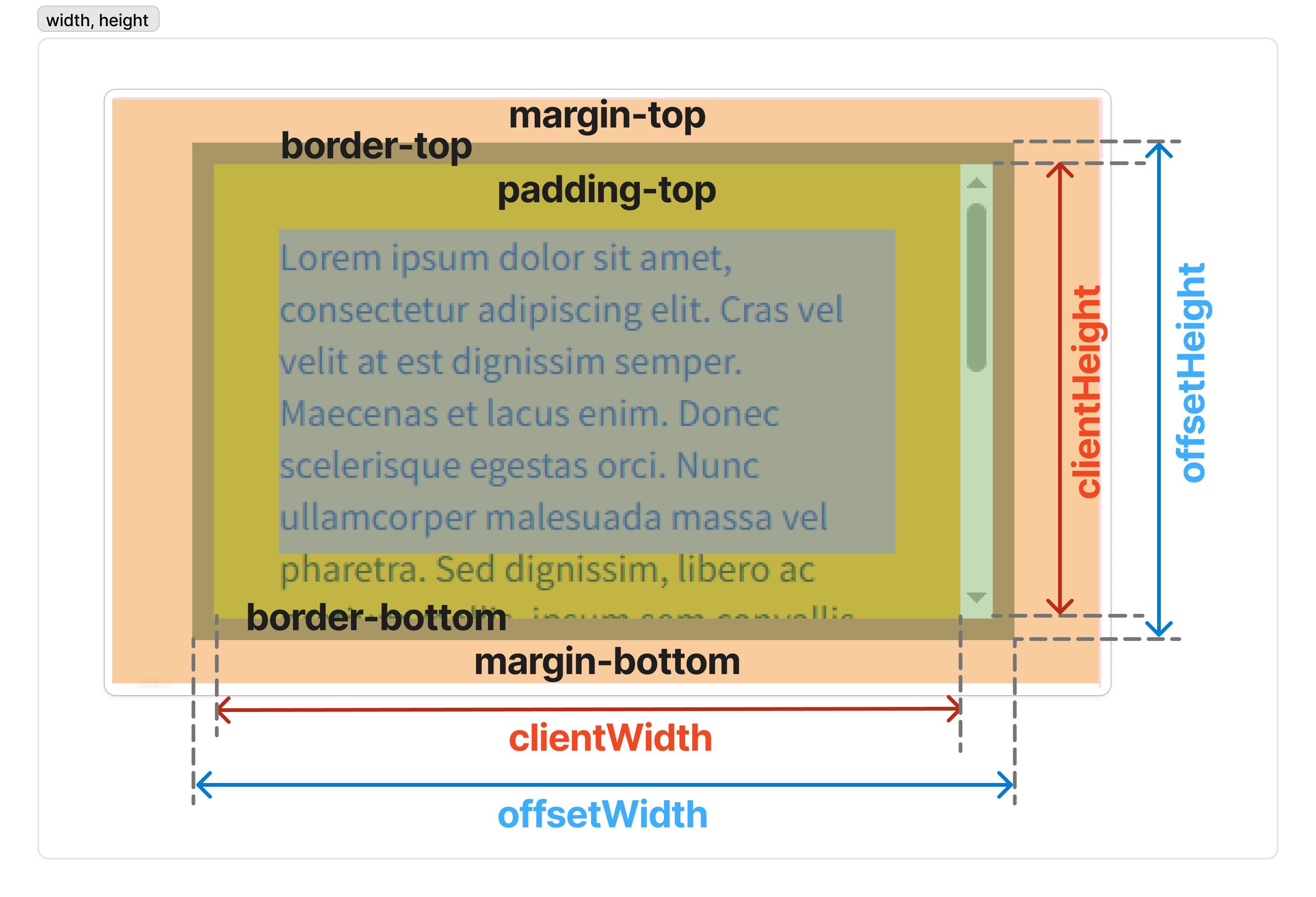
offsetWidth, offsetHeigth
참고 자료 : mdn web docs HTML Element offsetWidth, mdn web docs HTML Element offsetHeight
- 문서의 한 요소가 보이는 크기(
width,height), 스크롤바,padding,border를 모두 포함한 공간을 얼마나 차지하는지 확인할 때HTMLElement.offsetWidth와HTMLElement.offsetHeight를 사용한다.margin은 포함하지 않는다.
- 대상 요소의 가상 요소before,
::after의 크기는 포함하지 않는다. - 요소가
display: none등으로 보이지 않는 상태라면0을 반환한다.
HTMLElement.offsetWidth;
HTMLElement.offsetHeight;
Element.getBoundingClientRect()로도width와height를 얻을 수 있으며, 두 경우에 얻을 수 있는width와height값이 약간 차이가 있다.
offsetWidthoffsetHeight |
getBoundingClientRect() |
|
|---|---|---|
| 반환 | 각각 width와 height 를 반환 |
여러 속성을 반환width와 height 이 포함됨 |
transform 적용 시( width=100px;transform:scale(0.5);) |
요소의 레이아웃을 반환width = 100px; |
렌더링 된 크기를 반환width = 50px; |
| 반환값 근사 | 정수로 반올림 | 소수점으로 반환 |
<div class="container"></div>
.container {
	padding: 30px;
	margin: 20px auto;
	width: 300px;
	height: 150px;
	border: 10px solid black;
	background: orange;
	overflow-y: scroll;
}
const container = document.querySelector(".container");
console.log('offsetWidth : ', container.offsetWidth);
console.log('offsetHeight : ', container.offsetHeight);
offsetWidth=width+padding-left+padding-right+border-left+border-rightoffsetHeight=height+padding-top+padding-bottom+border-top+border-bottom
offsetWidth : 380
offsetHeight : 230
- 이 상태에서
box-sizing: border-box를 적용하면offsetWidth = width,offsetHeight = height로 나온다.
.container {
	box-sizing: border-box;
	padding: 30px;
	margin: 20px auto;
	width: 300px;
	height: 150px;
	border: 10px solid black;
	background: orange;
	overflow-y: scroll;
}
offsetWidth : 300
offsetHeight : 150
clientWidth, clientHeight
참고 자료 : mdn web docs Element ClientWidth, mdn web docs Element ClientHeight
- 현재 보여지는 내용물의
width와heigth를 얻을 때는Element.clientWidth와Element.clientHeight를 사용한다. padding과 요소 내부의 크기를 반환하며,border,margin, 수직 스크롤바의 너비는 제외한다.- inline 요소와 CSS가 없는 요소의
clientWidth와clientHeight는0이다.
Element.clientWidth;
Element.clientHeight;
- 위의 예제에서
clientWidth와clientHeight를 출력해서 비교하면 값이 더 낮게 나온다.
<div class="container"></div>
.container{
	padding: 30px;
	margin: 20px auto;
	width: 300px;
	height: 150px;
	border: 10px solid black;
	background: orange;
	overflow-y: scroll;
}
const container = document.querySelector(".container");
console.log(container.clientWidth);
console.log(container.clientHeight);
clientWidth=width+padding-left+padding-right-vertical scrollbar widthclientHeight=height+padding-top+padding-bottom
clientWidth : 345
clientHeight : 210