문서 객체 모델(Document Object Model)
✒️ 2025-04-17 17:13 내용 수정
문서 객체 모델(Document Object Model)
XML이나 HTML 문서에 접근하기 위한 일종의 인터페이스
- 참고 자료 : TCPSchool js dom concept
- DOM은 문서 내의 모든 요소를 정의하고 각각의 요소에 접근하는 방법을 제공한다.
- 웹 브라우저 동작에서 구문 분석(Parsing 단계) 때 서버로부터 받은 데이터에 있는 HTML, CSS, Javascript 등을 분석하여 DOM을 생성한다.
- 웹 브라우저의 동작 참고.
- JavaScript를 이용하여 HTML 문서의 요소를 추가하거나 제거할 수 있고, 각 요소의 속성을 변경하거나 이벤트를 지정할 수 있다.
- 또한 CSS 스타일을 변경할 수 있다.
<html>은 루트 노드이며, 부모 요소는 없고, 자식 요소는<head>와<body>이다.
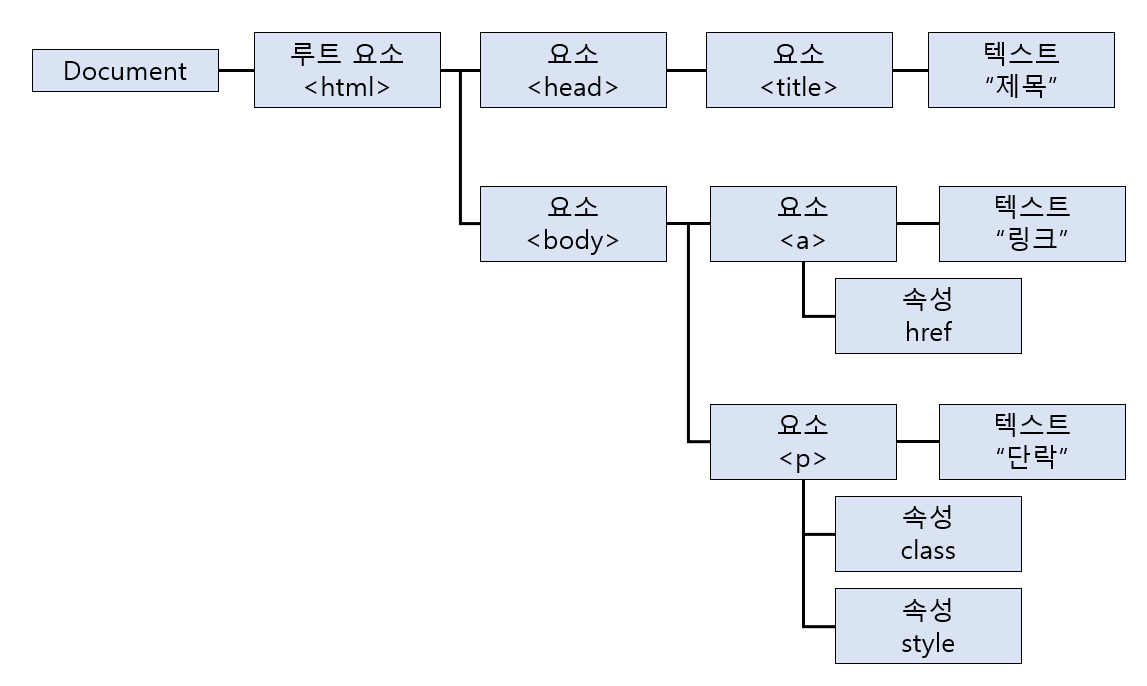
Document 객체
웹 페이지 그 자체를 의미하는 객체
- JavaScript에서 출력이나 HTML 요소를 추가할 때 그 document가 맞다.
- 웹 페이지에 존재하는 HTML 요소에 접근하려면
document객체에 접근해야 한다.
HTML 요소 가져오기
- JavaScript로 HTML 요소를 제어하려면 제어하고자 하는 요소 객체를 먼저 가져와야 한다.
- HTML 태그를 선택해서 가져오거나, CSS로 부여한 클래스, ID, Name 등의 식별자로 가져올 수 있다.
| 함수 | 설명 |
|---|---|
document.getElementsByTagName("태그명") |
해당 태그를 모두 선택 배열로 반환되며 index로 번호지정( tag[index]) |
document.getElementById("ID값") |
해당 ID값을 가진 태그 선택 |
document.getElementsByClassName("클래스값") |
해당 클래스 값을 가진 요소를 모두 선택 배열로 반환되며 index로 번호지정( tag[index]) |
document.getElementsByName(name속성값) |
해당 name 속성값을 가지는 모든 요소 선택 |
docunemt.querySelector('식별자') |
해당 식별자로 요소를 선택 찾은 내용 중 첫 번째 요소만 반환함 |
'#my-id' : 해당 ID값을 가진 요소를 선택 |
|
'.my-cls' : 해당 클래스 값을 가진 요소 선택 |
|
docunemt.querySelectorAll('식별자') |
해당 식별자를 가지는 모든 요소 선택 배열로 반환되어 index로 번호지정( tag[index]) |
<!DOCTYPE html>
<html>
	<head>
		<meta charset="UTF-8">
		<title>Insert title here</title>
	</head>
	<body>
		<p>p태그</p>
		<p class="pclass">클래스가 있는 p태그</p>
		<p id="pid">id가 있는 p태그</p>
		<p name="pname">name이 있는 p태그</p>

		<script>
			let p1 = document.getElementsByTagName('p');
			let p2 = document.getElementById('pid');
			let p3 = document.getElementsByClassName('pclass');
			let p4 = document.getElementsByName('pname');
			let p5 = document.querySelector('#pid');
			let p6 = document.querySelector('.pclass');

			console.log(p1);
			console.log(p2);
			console.log(p3);
			console.log(p4);
			console.log(p5);
			console.log(p6);
		</script>
	</body>
</html>
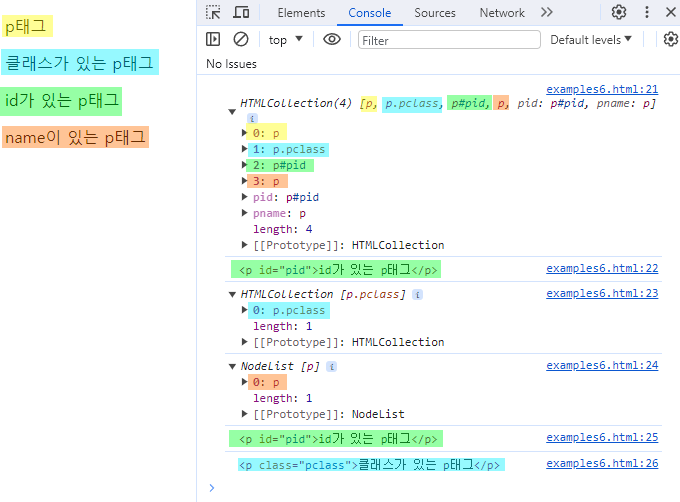
부모, 자식, 형제 요소 탐색
참고 자료 : mdn web docs DOM, W3School DOM Navigation, mdn web docs nextElementSibling
- 부모 요소 탐색
| 속성 | 설명 |
|---|---|
parentNode |
현재 노드의 부모 노드 반환 |
parentElement |
현재 요소의 부모 요소를 반환 |
const element = document.getElementById('myElement');
const parent = element.parentNode; // 또는 element.parentElement;
- 자식 요소 탐색
| 속성 | 설명 |
|---|---|
childNodes |
현재 노드의 자식 노드를 반환 텍스트, 주석 등을 포함 |
children |
현재 요소의 자식 요소를 반환 |
firstChild |
현재 노드의 첫 번째 자식 노드를 반환 |
firstElementChild |
현재 요소의 첫 번째 자식 요소를 반환 |
lastChild |
현재 요소의 마지막 자식 노드를 반환 |
lastElementtChild |
현재 요소의 마지막 자식 요소를 반환 |
const parent = document.getElementById('parentElement');
const allChildren = parent.childNodes; // 텍스트 노드 포함
const elementChildren = parent.children; // 요소 노드만
const firstChild = parent.firstChild;
const firstElement = parent.firstElementChild;
- 형제 요소 탐색
| 속성 | 설명 |
|---|---|
previousSibling |
해당 요소의 이전 형제 노드를 반환 |
previousElementSibling |
해당 요소의 이전 형제 요소를 반환 |
nextSibling |
해당 요소의 다음 형제 노드를 반환 |
nextElementSibling |
해당 요소의 다음 형제 요소를 반환 |
const element = document.getElementById('myElement');
const prevSibling = element.previousSibling;
const nextSibling = element.nextSibling;
const prevElement = element.previousElementSibling;
const nextElement = element.nextElementSibling;
HTML 객체들
- HTML DOM의 객체 집합을 이용해 여러 객체를 가져올 수 있다.
- 참고 자료 : TCPSchool js dom document
| 객체 집합 | 설명 |
|---|---|
document.anchors |
name 속성을 가지는 <a> 요소를 모두 반환 |
document.body |
<body> 요소를 모두 반환 |
document.cookie |
HTML 문서의 cookie 반환 |
document.domain |
HTML 문서가 위치한 서버의 도메인 네임 반환 |
document.forms |
<form> 요소를 모두 반환 |
document.images |
<img> 요소를 모두 반환 |
document.links |
href 속성을 가지는 <area>와 <a> 요소 모두 반환 |
document.referrer |
링크 되어있는 문서의 URI를 반환 |
document.title |
<title> 요소를 모두 반환 |
document.URL |
HTML 문서의 완전한 URL 주소를 반환 |
document.baseURI |
HTML 문서의 absolute base URI를 반환 |
document.doctype |
HTML 문서의 문서 타입을 반환 |
document.documentElement |
<html> 요소를 반환 |
document.documentMode |
웹 브라우저가 사용하고 있는 모드를 반환 |
document.documentURI |
HTML 문서의 URI를 반환 |
document.embeds |
|
document.head |
<head> 요소를 반환 |
document.implementation |
HTML DOM 구현(implementation)을 반환 |
document.inputEncoding |
HTML 문서의 문자 인코딩 형식을 반환 |
document.lastModified |
HTML 문서의 마지막 갱신 날짜 및 시간을 반환 |
document.readyState |
HTML 문서의 로딩 상태를 반환 |
document.scripts |
<script> 요소를 모두 반환 |
document.strictErrorChecking |
오류 강제 검사 여부를 반환 |