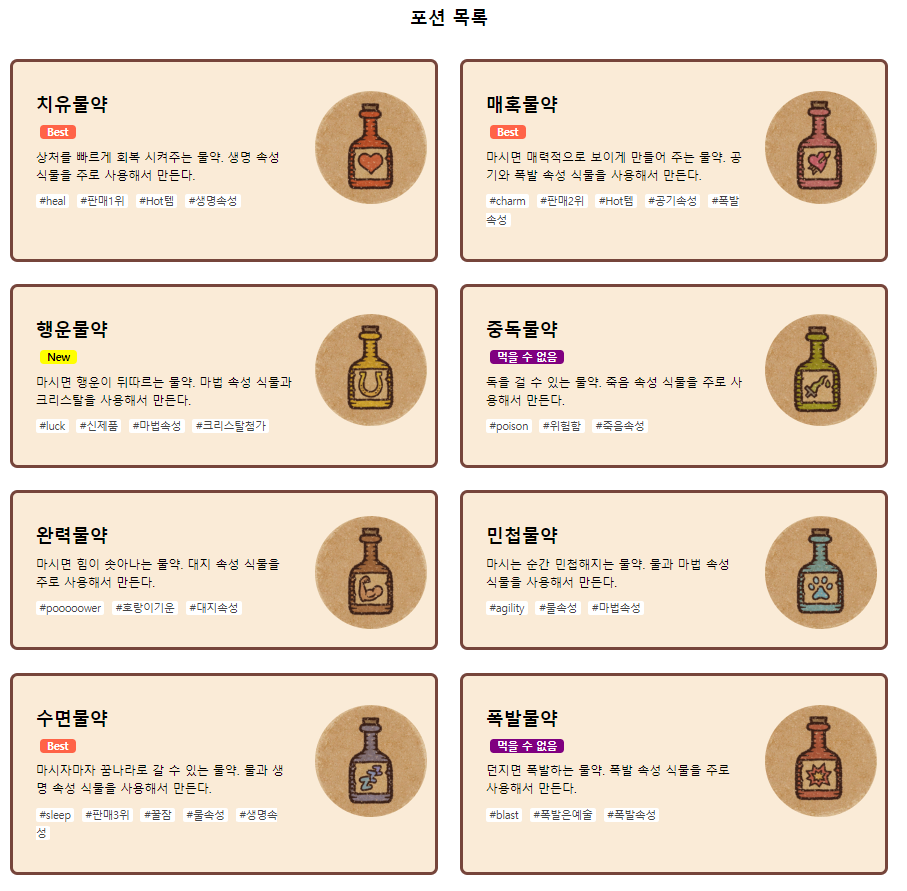
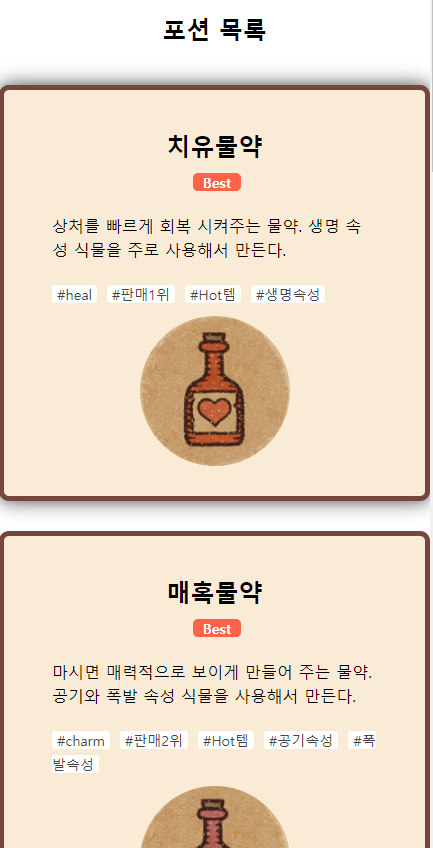
그림과 글이 함께 있는 박스 배치 1
✒️ 2025-05-16 13:05 내용 수정
실습 목표
- 하위 레이아웃 배치 스타일 1을 실습한다.
- 코드는 수업 때 사용한 내용을 변형하였고, 내용은 게임 Potion Craft에 등장하는 포션을 사용하였다.
실습 흐름
- HTML을 레이아웃 구조별로 작성한다.
- 데이터를 저장할 javascript를 작성 후 다른 js 파일에 내보낸다.
- 데이터를 받아 HTML에 작성할 내용을 쓴 js 파일을 HTML에 연결한다.
- 구조에 맞게 CSS를 적용한다.
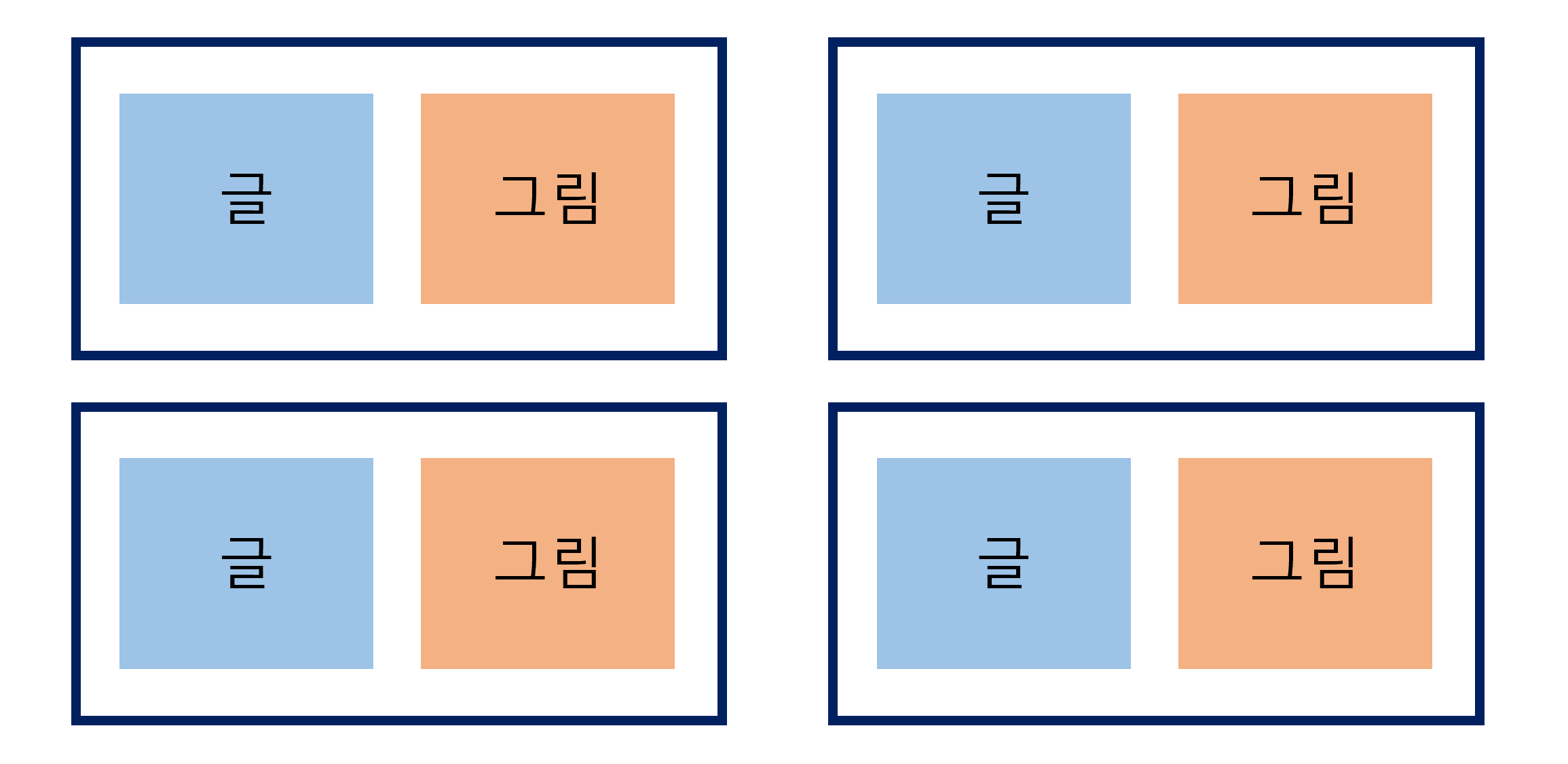
배치 그림
- 아이템을 아래 그림처럼 배치하는 HTML과 CSS를 작성한다.
1. HTML
- 레이아웃을 참고하여 기본 틀을 아래처럼 작성한다.
- 레이아웃 만들기 참고.
<!DOCTYPE html>
<html lang="en">
<head>
    <meta charset="UTF-8">
    <meta name="viewport" content="width=device-width, initial-scale=1.0">
    <title>Document</title>
    <link rel="stylesheet" href="css/style-1.css">
</head>
<body>
    <section class="content potion">
        <div class="inner">
            <h2 class="title">포션 목록</h2>
            <div class="wrap"></div>
        </div>
    </section>

    <script src="js/main-1.js" type="module"></script>
</body>
</html>
2. JS 파일
- 데이터 js 파일
- 각 포션의 정보를 배열과 객체로 정리하였다.
// 포션 메뉴들
let potion = [
    {
        pName : ['치유물약','heal'],
        content : '상처를 빠르게 회복 시켜주는 물약. 생명 속성 식물을 주로 사용해서 만든다.',
        hashtag : ['#heal', '#판매1위', '#Hot템', '#생명속성'],
        new : false,
        best : true,
        edible : true
    },
    {
        pName : ['매혹물약', 'charm'],
        content : '마시면 매력적으로 보이게 만들어 주는 물약. 공기와 폭발 속성 식물을 사용해서 만든다.',
        hashtag : ['#charm', '#판매2위', '#Hot템', '#공기속성', '#폭발속성'],
        new : false,
        best : true,
        edible : true
    },
    {
        pName : ['행운물약', 'luck'],
        content : '마시면 행운이 뒤따르는 물약. 마법 속성 식물과 크리스탈을 사용해서 만든다.',
        hashtag : ['#luck', '#신제품', '#마법속성', '#크리스탈첨가'],
        new : true,
        best : false,
        edible : true
    },
    {
        pName : ['중독물약', 'poison'],
        content : '독을 걸 수 있는 물약. 죽음 속성 식물을 주로 사용해서 만든다.',
        hashtag : ['#poison', '#위험함', '#죽음속성'],
        new : false,
        best : false,
        edible : false
    },
    {
        pName : ['완력물약', 'power'],
        content : '마시면 힘이 솟아나는 물약. 대지 속성 식물을 주로 사용해서 만든다.',
        hashtag : ['#pooooower', '#호랑이기운', '#대지속성'],
        new : false,
        best : false,
        edible : true
    },
    {
        pName : ['민첩물약', 'agility'],
        content : '마시는 순간 민첩해지는 물약. 물과 마법 속성 식물을 사용해서 만든다.',
        hashtag : ['#agility', '#물속성', '#마법속성'],
        new : false,
        best : false,
        edible : true
    },
    {
        pName : ['수면물약', 'sleep'],
        content : '마시자마자 꿈나라로 갈 수 있는 물약. 물과 생명 속성 식물을 사용해서 만든다.',
        hashtag : ['#sleep', '#판매3위', '#꿀잠', '#물속성', '#생명속성'],
        new : false,
        best : true,
        edible : true
    },
    {
        pName : ['폭발물약', 'blast'],
        content : '던지면 폭발하는 물약. 폭발 속성 식물을 주로 사용해서 만든다.',
        hashtag : ['#blast', '#폭발은예술', '#폭발속성'],
        new : false,
        best : false,
        edible : false
    }
]

// 포션 정보 내보내기
export default potion;
- 작성 js 파일
- 내보낸 정보를 가져와 HTML에 내용을 작성하는 코드를 작성한다.
// potions.js에서 potion을 가져온다.
import potion from './potions.js';

// 작성할 태그를 담을 div 가져오기
let potion_wrap = document.querySelector('.potion .wrap');
let result = '';

// 태그 작성
for (let i = 0; i < potion.length; i++) {

    // 1번 시작 및 내용 태그, 2번 hashtag 부분, 3번 종료 태그
    let tag = ['', '', ''];
    let new_tag = (potion[i].new) ? '<span class="new">New</span>' : '';
    let best_tag = (potion[i].best) ? '<span class="best">Best</span>' : '';
    let edible_tag = (potion[i].edible) ? '' : '<span class="edible">먹을 수 없음</span>';
    let img_src = `img/${potion[i].pName[1]}.PNG`;

    // 1번 시작 및 내용
    tag[0] = `<div class="box">
                <img src="${img_src}" alt="${potion[i].pName[0]}">
                <p class="name">
                    ${potion[i].pName[0]}<br>
                    ${new_tag}
                    ${best_tag}
                    ${edible_tag}
                </p>
                <p>${potion[i].content}</p>
                <p class="hashtag">`;

    // 2번 hashtag
    for (let j = 0; j < potion[i].hashtag.length; j++) {
        tag[1] += `<span>${potion[i].hashtag[j]}</span>`;
    }

    // 3번 종료 태그
    tag[2] = `</p></div>`;

    result += tag[0] + tag[1] + tag[2];
}

// 작성한 태그를 가져왔던 div에 넣기
potion_wrap.innerHTML = result;
CSS
- 각 요소의 배치 상태에 따라 작성한다.
*{margin:0; padding:0; box-sizing: border-box;}
/* content 설정 - 폭은 100% */
.content{width: 100%; padding:120px 0;}
/* inner 폭과 margin 설정 - 기본 설정 */
.inner{width:1170px; margin:0 auto;}

.content .title{margin: 0 0 40px; text-align: center;}

/* content를 flex box로 설정 */
.content .wrap{display: flex; justify-content: space-between; flex-wrap: wrap;}

/* 글과 그림이 들어간 박스 설정 - 한 화면에 2개가 들어오도록 너비 조정 */
.potion .box{
    position:relative;
    width: 570px; margin: 0 0 30px; padding: 30px 150px 30px 30px;
    border: 5px solid #76453B;
    border-radius: 10px;
    background-color: antiquewhite;
    transition: 0.3s;
}

/* 미디어 쿼리 - 한 화면에 inner가 다 들어오고, 박스도 다 들어오게 설정 */
@media screen and (max-width:768px) {
    .inner{width: 100%;}
    .potion .box{width: 100%;}
}

/* 이미지 위치를 오른쪽에 오도록 설정 */
.potion .box img{
    position:absolute; right:10px; top:15%; width: 150px; height: 150px;
    border-radius: 100px;
    display:block;
}

/* new와 best 표시 설정 */
.potion .box .name span{
    padding: 0 10px; margin-left: 5px;
    border-radius: 5px;
    text-transform: capitalize;
    font-size: 14px;
}
.potion .box .name .new{background-color: yellow;}
.potion .box .name .best{background-color: tomato; color:white;}
.potion .box .name .edible{background-color: purple; color:white;}

/* 박스 내 글 설정 */
.potion .box p{ width: 90%; margin: 10px 0; line-height: 1.5;}
.potion .box .name{font: bold 24px 'inherit';}
/* 박스 내 해시태그 설정 */
.potion .box .hashtag span{
    background-color: white; margin-right: 10px; padding: 0 5px;
    border-radius: 3px;
    font-size: 14px; color: #444;
}

/* 마우스를 올리면 박스에 그림자가 생기게 설정 */
.potion .box:hover{box-shadow: 0 0 20px #444;}

/* 박스 미디어 쿼리 - 사이즈 변경과 flex box 배치 변경 */
@media screen and (max-width:480px) {
    .potion .box{
        width:100%; padding:30px;
        display: flex; justify-content: center;
        flex-wrap: wrap;
    }
    .potion .box img{position:static; order: 1;}
    .potion .box .name{text-align: center;}
}
페이지 구현에 사용한 기능 체크
- 마우스를 올려 놓으면 그림자 효과 생기게 설정
.potion .box:hover{box-shadow: 0 0 20px #444;}
- 해시태그 설정
.potion .box .hashtag span{
    background-color: white; margin-right: 10px; padding: 0 5px;
    border-radius: 3px;
    font-size: 14px; color: #444;
}
- 미디어 쿼리 설정
@media screen and (max-width:768px) {
    .inner{width: 100%;}
    .potion .box{width: 100%;}
}

@media screen and (max-width:480px) {
    .potion .box{
        width:100%; padding:30px;
        display: flex; justify-content: center;
        flex-wrap: wrap;
    }
    .potion .box img{position:static; order: 1;}
    .potion .box .name{text-align: center;}
}