PostgreSQL Cluster initialisation 에러
✒️ 2026-03-01 13:16 내용 수정
📋 문제 개요
문제 설명
- PostgreSQL 18v을 설치 하고 동작을 확인.
- PostgreSQL 16v을 설치하고 동작을 확인.
- 로컬 PostgreSQL이 정상적으로 작동하다가 Flask 서버 가동 테스트 후엔 실행되지 않는 문제 발생
- timeout으로 인한 접근 불가 문제
- 서비스에서 재시작 불가(오류 코드 1053)
- 이후 PostgreSQL 18v과 16v을 모 삭제 후 재설치를 진행했으나 다음과 같은 에러가 발생하면서 PostgreSQL이 제대로 설치되지 않음(기타 구성 요소는 설치됨)
- “The database cluster initialisation failed”
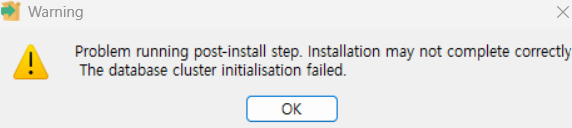
- “The database cluster initialisation failed”
🔍 상세 정보
발생 환경
- 환경: 개발
- 서버/인스턴스: 데이터베이스
- 관련 버전: PostgreSQL 18, 16
재현 방법
- 아무 설정도 진행되지 않은 초기 상태의 컴퓨터에서 PostgreSQL 설치 진행
에러 메시지 및 로그
- 설치 로그 확인 :
C:\\Users\\사용자명\\AppData\\Local\\Temp\\install-postgresql.log
Initializing PostgreSQL database cluster...

Executing: "C:\\Program Files\\PostgreSQL\\16\\bin\\initdb.exe" --pgdata="D:\\pgdata\\PostgreSQL16\\data" --username="postgres" --encoding=UTF8 --pwfile="C:\\Users\\사용자\\AppData\\Local\\Temp\\postgresql_installer_360f7ead8f\\cb313bda.tmp" --auth=scram-sha-256

initdb exit code = -1073741515

Called Die(Failed to initialise the database cluster with initdb)...

Script stderr:
 Die : Failed to initialise the database cluster with initdb
À§Ä¡ C:\\Program Files\\PostgreSQL\\16\\installer\\server\\initcluster.ps1:276 ¹®ÀÚ:5
+     Die "Failed to initialise the database cluster with initdb"
+     ~~~~~~~~~~~~~~~~~~~~~~~~~~~~~~~~~~~~~~~~~~~~~~~~~~~~~~~~~~~
    + CategoryInfo          : NotSpecified: (:) [Write-Error], WriteErrorException
    + FullyQualifiedErrorId : Microsoft.PowerShell.Commands.WriteErrorException,Die


Error running C:\\WINDOWS\\System32\\WindowsPowerShell\\v1.0\\powershell.exe -ExecutionPolicy Bypass -File "C:\\Program Files\\PostgreSQL\\16\\installer\\server\\initcluster.ps1" "NT AUTHORITY\\NetworkService" "postgres" "S-1-5-21-2307034687-2981857080-2948259514-1001" "****" "C:\\Users\\사용자\\AppData\\Local\\Temp\\postgresql_installer_360f7ead8f" "C:\\Program Files\\PostgreSQL\\16" "D:\\pgdata\\PostgreSQL16\\data" 5432 "DEFAULT" 0: Die : Failed to initialise the database cluster with initdb
À§Ä¡ C:\\Program Files\\PostgreSQL\\16\\installer\\server\\initcluster.ps1:276 ¹®ÀÚ:5
+     Die "Failed to initialise the database cluster with initdb"
+     ~~~~~~~~~~~~~~~~~~~~~~~~~~~~~~~~~~~~~~~~~~~~~~~~~~~~~~~~~~~
    + CategoryInfo          : NotSpecified: (:) [Write-Error], WriteErrorException
    + FullyQualifiedErrorId : Microsoft.PowerShell.Commands.WriteErrorException,Die

Problem running post-install step. Installation may not complete correctly
 The database cluster initialisation failed.
Setting variable whoami from C:\\WINDOWS\\System32\\whoami
Script exit code: 0
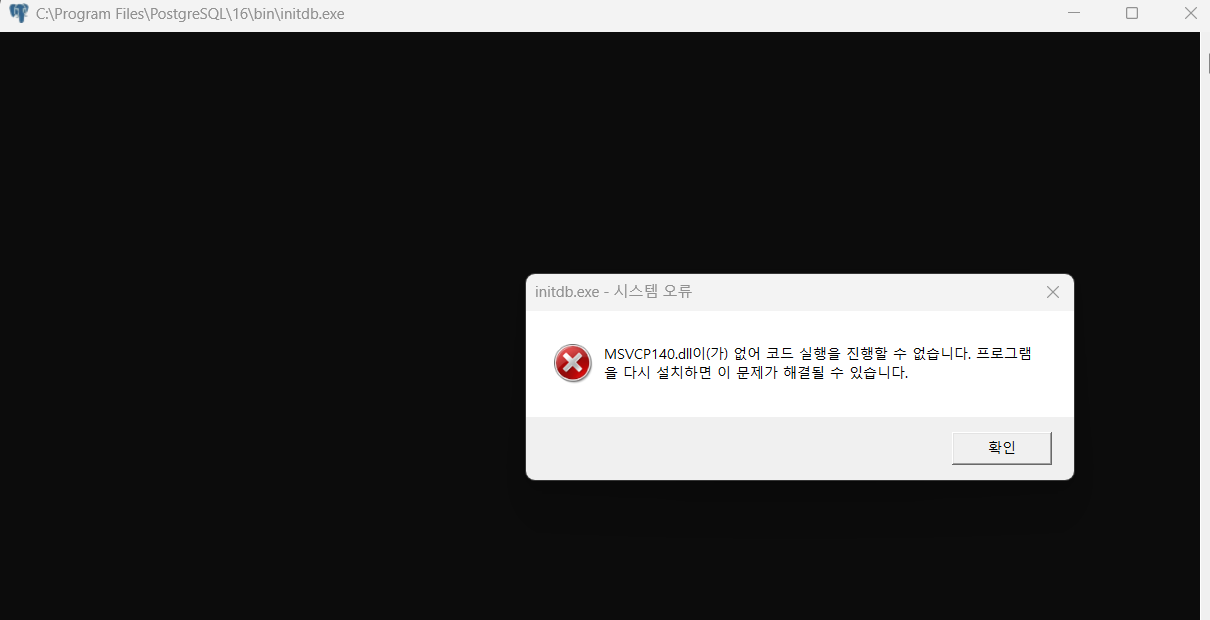
C:\\Program Files\\PostgreSQL\\16\\bin\\initdb.exe를 실행해서 수동 초기화를 시도하던 중 사진과 같이MSVCP140.dll이 없다는 에러가 발생
🔎 원인 분석
조사 과정
- ChatGPT로 첫 번째 문제 원인부터 질의응답을 진행하며
initdb.exe수동 빌드를 진행 - 수동 빌드 진행 중
msvcp140.dll이 없다는 에러 발견 - ChatGPT에 재질문 후 원인을 찾음
근본 원인
msvcp140.dll 은 C++ runtime에 속하는 파일이며, 해당 파일이 컴퓨터에 설치되지 않아 C/C++로 빌드된 실행 파일이 바로 실행되지 않음
- 이전에 MS의 vs_build_tools로 “MSVC 빌드 도구”를 다운 받았을 때 프로그램 빌드 시 필요한 도구만을 받았다는 점을 간과함
✅ 해결 방법
재설치 시 Data 폴더 변경
C:\\Users\\사용자\\AppData\\Local\\Temp내의 Postgresql 관련 폴더 제거C:\\Program Files\\PostgreSQL폴더 제거C:\\ProgramData\\PostgreSQL폴더 제거- PostgreSQL 재설치 시 data 폴더는
C:\\Program Files\\PostgreSQL하위가 아닌 다른 위치에 설치
MSVCP140.dll이 없는 경우
-
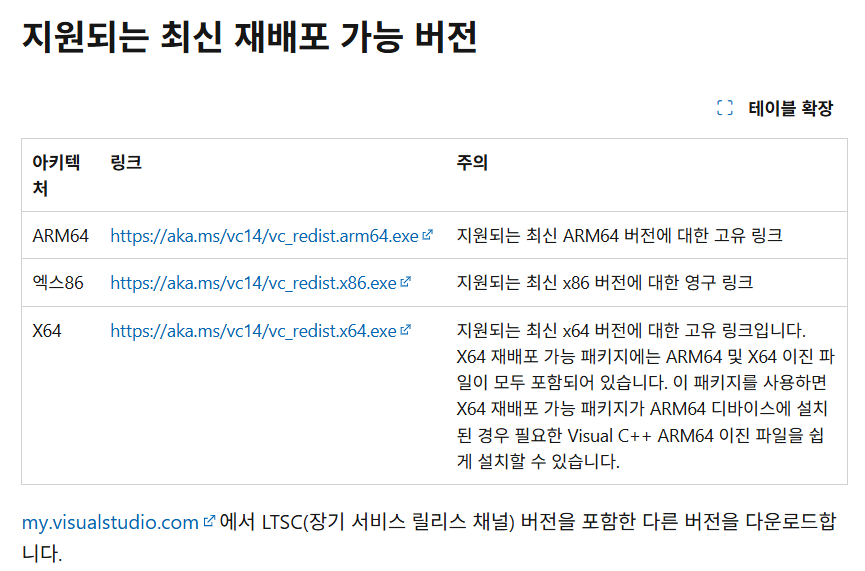
“Microsoft Visual C++ 재배포 가능 패키지 최신 지원되는 다운로드”를 브라우저에 검색 후 MS 공식 페이지로 이동
-
현재 컴퓨터의 운영체제 확인(파일 탐색기 - 내PC - 속성 - 시스템 종류)
-
windows10 기준 32비트라면 x86을, 64비트라면 x64를 다운로드
-
PostgreSQL을 제거 후 다시 설치
- initdb.exe를 사용하여 수동으로 빌드를 진행해서 설치도 가능
- 다만 사용자 비밀번호 설정 등 보안 설정을 수동으로 추가 진행해야 할 필요가 있어 PostgreSQL을 재설치함
📎 참고 자료
- 참고 문서:
- https://www.reddit.com/r/PostgreSQL/comments/1ficv4i/postgresql_database_cluster_initialization_failed/?tl=ko
- https://mksm10141015.tistory.com/17
- https://learn.microsoft.com/ko-kr/cpp/windows/latest-supported-vc-redist?view=msvc-170#latest-supported-redistributable-version
- https://silver-iron.tistory.com/entry/MSVCP140dll-코드-실행-오류-해결-방법